
![7 Best SEO Content Writing Tools We Use at Outreach Monks [2026] blog image](https://outreachmonks.com/wp-content/uploads/2026/10/7-Best-SEO-Content-Writing-Tools-We-Use-at-Outreach-Monks-2026-blog-image.png)
Search for SEO content writing tools and you get long lists of software with a price beside each name. What those lists rarely show is the part that decides whether the content works: which tool hands off to which, and where a person has to take over.
This article is built around that handoff. It covers seven tools, each with a distinct job across research, briefing, drafting, editing, checking and measurement, and the workflow that connects them. It also covers the decisions none of them can make, which matter more now that zero-click searches and AI-generated answers mean a page has to earn its place by being useful, not just by matching keywords.
The short version. Ahrefs Keywords Explorer to choose topics and read the results page. AlsoAsked to map the questions readers ask next. Surfer to turn that research into a brief and check coverage. ChatGPT for structure and first drafts under human direction. Grammarly for editorial polish. Copyscape for duplicate checks. Google Search Console to see what happened after publishing.
Why We Are Sharing This Stack
This is the seven-tool stack we would put behind an agency content workflow. Each tool made the list because it does a different job, has clear current plan terms, and overlaps as little as possible with the others. It sits on top of an approach to content that we have already made public.
On our page about AI content creation, we set out the split. AI supports research, structure, content briefs and competitive analysis. People own content quality and expert input. A brief from AI is a starting point, not a finished asset. Every tool below sits on one side of that line, and we say which.
Google’s guidance points the same way. It says generative AI “can be particularly useful when researching a topic, and to add structure to original content”, while using it to generate many pages without adding value for users may breach its scaled content abuse policy, which applies “no matter how it’s created”. So the question to ask about any tool is not whether it uses AI. It is whether it helps a person add value.
One limit up front: this is a reasoned selection from published product information, not a controlled benchmark of output quality. The methodology note at the end says what was checked and what was not.
The Lineup: Where Each Tool Fits
Each tool below has a place in the workflow, a reason to be there, and a limit. Prices are list prices read on each vendor’s own pages in October 2026.
STAGE 1 RESEARCH AND SEARCH INTENT
1. Ahrefs Keywords Explorer: Topic and Results Page Research

Role in the workflow: choose the topic, size the opportunity, read what Google already rewards.
Before any brief exists, someone has to decide whether a topic deserves an article and what the article needs to be. Keywords Explorer is where that happens. Ahrefs says its keyword database holds 28.7 billion keywords filtered from 110 billion discovered, across 217 locations, so it is rarely short of data for the market you are writing for.
Three features matter most to content teams. Traffic potential estimates what the top-ranking page earns for a keyword, which says more about a topic’s worth than the volume of one phrase. Parent Topic shows the broader subject a page could rank for, which settles whether two keywords need two articles or one. And its AI reading of the results page, which Ahrefs says reveals search intent and can group keywords by Parent Topic, speeds up the first pass of a topical map. Keep in mind that Keyword Difficulty is calculated from the links pointing at ranking pages, so it tells you how hard a page is to outrank on links, not how hard the content is to write.
Where it falls short. It tells you what to write about, not how to write it, and the AI intent reading is a shortcut for opening the live results yourself, not a substitute for doing so. At $129 a month for the entry plan it is also the largest single line in this stack. Teams that research only occasionally can start with Search Console and free tools until volume justifies the spend.
List price : Lite $129 a month, Standard $249, Advanced $449, Enterprise $1,499, on monthly billing. Ahrefs says annual billing saves up to 17%.
2. AlsoAsked: Mapping the Follow-Up Questions
Role in the workflow: turn one topic into the sequence of questions a reader asks next.
Once the topic is chosen, the next question is what a reader asks after the first answer. AlsoAsked turns Google’s People Also Ask boxes into a map that shows how one question leads to another. Those branches become section headings and FAQ candidates drawn from real queries, which also helps with featured snippets. Note that it covers People Also Ask, a different feature from the People Also Search For suggestions that appear further down the results.
The features that matter are practical: location-specific results, bulk and deep searches, PNG and CSV export so a map can go straight into a brief, and an API and MCP server connection for teams that want to feed the data to an AI assistant. All paid plans allow unlimited users.
Where it falls short. It maps questions, not demand. There is no search volume or difficulty here, so it works alongside a research tool and never in place of one. Credits are the constraint: Basic includes 100 a month and keeps search history for 24 hours, so a team producing many briefs will outgrow it.
List price : Basic $12 a month (100 credits), Lite $23 (300), Pro $47 (1,000), excluding tax. Unregistered users get a small number of free searches.
STAGE 2 BRIEFING AND OPTIMISATION
3. Surfer: Briefs, Guidelines and Coverage Checks
Role in the workflow: convert research into a brief a writer can use, then check coverage once the draft exists.
Surfer sits between research and drafting, and again after the draft exists. In its Content Editor, guidelines are built from the pages ranking in Google’s top 10 for your chosen location, plus the pages most cited in AI answers. An Outline Builder suggests headings and questions, and a Content Score tracks coverage as you write. This is the point where research becomes a brief.
Surfer’s own advice is worth following and extending: choose only competitor pages that share your search intent, because the guidelines are only as good as the pages you feed them. It also says it scans a domain and inserts internal links automatically. We would treat those as suggestions and check each against how internal links are meant to work, including whether any orphan pages still need a home.
Where it falls short. Content Score is Surfer’s own measure, not a Google metric, and chasing it produces pages shaped like the ones already ranking. The platform also bundles an AI writer, an AI detector and a humanizer. The writer overlaps with the drafting tool below, and we would not build a process around a detector or humanizer, because Google judges content by the value it adds, not by how it was produced. The pricing page does not state a free trial length.
List price : Discovery $49 a month (120 documents, 1 seat), Standard $99 (360 documents, 3 seats), Pro $182 (360 documents, 5 seats), Peace of Mind $299, all billed yearly. Monthly-billing prices are not shown. AI visibility tracking starts on the $82 AI Search Analytics plan, and Discovery has none.
STAGE 3 DRAFTING
4. ChatGPT: Structure and First-Draft Assistance
Role in the workflow: speed up the mechanical work once the brief and the expert input are in.
After the brief is agreed and the subject-matter input is collected, a general-purpose assistant helps with the slow mechanical work: tightening an outline, turning interview notes or a call transcript into a first draft, producing alternative introductions, or summarising a source so a writer can decide whether it is worth reading. This is the use Google describes when it says generative AI can help with research and structure. The writer still owns the argument and the voice.
Choose the plan by how client material is handled. OpenAI states that on its Free, Go, Plus and Pro plans conversations may be used to improve models unless you opt out, while its Business plan does not train on business data by default. For an agency pasting in client drafts, that difference matters more than any feature.
Where it falls short. Google’s own guidance spells out the risk: generative models “don’t retrieve facts, but predict a likely sequence of words”, so every statistic, quote and product claim needs checking against a source. Other assistants, including Claude and Gemini, fill the same slot. We selected on documented plan terms, not on a benchmark of output quality, so teams already standardised on another assistant lose little by keeping it.
List price : Plus $20 a month. Business $20 per user a month on annual billing or $25 on monthly billing, with a two-user minimum.
STAGE 4 EDITING AND VERIFICATION
5. Grammarly: Editorial Polish
Role in the workflow: catch what a tired editor stops seeing, after the substantive edit is done.
Grammarly belongs after the draft is structurally final and a person has made the substantive edits. It handles the layer readers notice and editors stop seeing by the third read: unclear sentences, shifts in tone, repeated words and mechanical errors. For agencies, the useful feature is the style guide, which lets several writers work to one house style. Pro allows one style guide, and Enterprise allows unlimited.
Pro also adds tone adjustment, plagiarism and AI detection, and 2,000 generative AI prompts per member each month. The Free plan gives 100 prompts and no plagiarism detection.
Where it falls short. It checks how something is written, not whether it is true, and it will polish a wrong sentence as readily as a right one. Its plagiarism check overlaps with Copyscape below. An AI detection score is best read as a prompt for an editor to look closer, not as a verdict. The plans page lists monthly prices only, so confirm annual terms at checkout.
List price : Free; Pro $12 a month with a 7-day free trial; Enterprise on request.
6. Copyscape Premium: Duplicate Content Checks

Role in the workflow: the last check before publishing, and the first check on work from a new writer.
Copyscape Premium searches the web for text that matches yours. It is priced per search: 3 cents for up to 200 words plus 1 cent for each additional 100, so a 2,000-word article costs about 21 cents. Batch search can check up to 10,000 pages in one operation, and a private index lets you test new content against your own library, which catches the quiet duplication that appears when a site runs several articles on adjacent topics.
It is also useful whenever existing text is being rewritten. If you are rewording existing web content, a check afterwards is cheap insurance that the result is not still too close to the source.
Where it falls short. It finds matching text, not matching ideas, and it does not detect AI authorship. Copyscape says it checks originality whether content was written by humans or generated by AI. A clean result means the wording is unique, not that the page adds anything new.
List price : 3 cents per search of up to 200 words, plus 1 cent per additional 100 words. No minimum deposit is listed on the page.
STAGE 5 MEASUREMENT AND REFRESH
7. Google Search Console: What Happened After Publishing
Role in the workflow: the only tool here that reports real performance in Google Search.
The Performance report shows impressions, clicks, click-through rate (clicks divided by impressions) and average position for your own pages, straight from Google. In practice it drives the refresh queue. Pages with strong impressions but weak click-through need a better title and description, and our CTR calculator helps size the gap. Pages whose average position slips are candidates for an update. If you are weighing it against analytics, our comparison of Search Console and Google Analytics covers what each is for.
Where it falls short. It only reports on properties you own, so there is no competitor data. Average position is averaged across all the queries a page appears for, so it needs reading alongside the query list. And it cannot show demand for topics you do not yet rank for, which is why it sits after the research tools, not instead of them.
Where These Tools Overlap, and Which One Should Win
Seven tools with no overlap would be unusual. These are the four places where functions collide, and the call we would make in each.
- Drafting. Surfer’s AI writer and ChatGPT both draft. Use one. We would draft in the general-purpose assistant and keep Surfer for guidelines and coverage checks, which is what it is built around.
- Plagiarism checks. Grammarly, Surfer and Copyscape all offer one. Treat Copyscape as the dedicated check, with its private index and batch search, and the others as a convenience while editing.
- Search intent. Ahrefs’ AI reading and Surfer’s competitor guidelines both infer intent from the results. Neither replaces opening the live results page and reading what is there.
- Internal links. Surfer can insert them automatically. A person should decide which pages deserve the link and what the anchor says.
Quick Comparison of the Seven Tools
Here is how the seven line up by stage, so you can see at a glance which job each one does and what it costs to start.
| Tool | Stage | Best For | Starting Price | Main Limitation |
|---|---|---|---|---|
| Ahrefs Keywords Explorer | Research | Choosing topics and reading the results page | $129 a month | Largest cost; says what to write, not how |
| AlsoAsked | Research | Mapping follow-up questions | $12 a month | No volume or difficulty data |
| Surfer | Briefing | Briefs and coverage checks | $49 a month, billed yearly | Score is not a Google metric |
| ChatGPT | Drafting | Structure and first drafts | $20 a month | Can state false facts; check data terms |
| Grammarly | Editing | Polish and house style | Free; Pro $12 a month | Checks writing, not accuracy |
| Copyscape Premium | Verification | Duplicate text checks | About 21 cents per 2,000 words | Matches wording, not ideas or AI use |
| Google Search Console | Measurement | Real performance and refresh decisions | Free | Own sites only; no competitor data |
Prices are list prices read on vendor pages and change often. Confirm on each vendor’s site before buying.
What the Stack Costs
Almost no comparison adds the tools up, so here is the arithmetic for one seat at each entry plan.
| Tool | Entry Plan Used | Per Month |
|---|---|---|
| Ahrefs | Lite | $129 |
| AlsoAsked | Basic | $12 |
| Surfer | Discovery, billed yearly | $49 |
| ChatGPT | Plus | $20 |
| Grammarly | Pro | $12 |
| Copyscape | Pay per search | About $0.21 per article |
| Google Search Console | Free | $0 |
| Total, one seat | — | About $222, plus Copyscape |
The Workflow: How the Seven Tools Fit Together
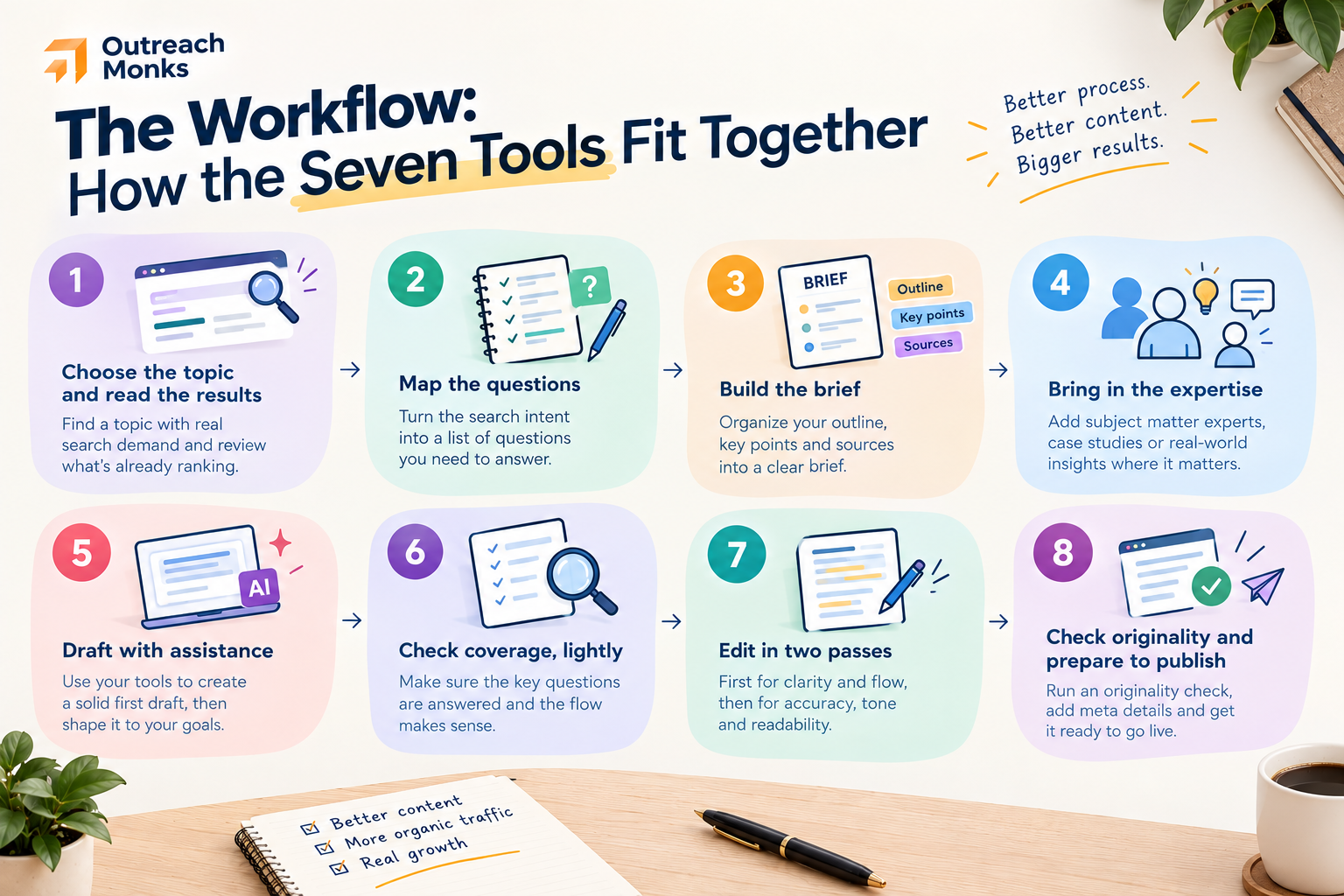
Tools only help if the handoffs are clear. This is the sequence we would run, with the person responsible for each decision. It is a recommended workflow built on the public principles above, and each step names where a human takes over.
- Choose the topic and read the results. Use Ahrefs Keywords Explorer for traffic potential and Parent Topic, then open the live results and read them. A person decides the intent and whether the team has anything to add.
- Map the questions. Run the topic through AlsoAsked. The branches become draft headings and FAQ candidates.
- Build the brief. Generate Surfer guidelines from same-intent competitors only, then add the questions from step 2, the angle, the sources and who will supply the expertise. The angle is a human decision.
- Bring in the expertise. Interviews, subject-matter notes, first-hand examples and original data go in before drafting. No tool in this stack supplies this, and it is what Google’s people-first guidance asks about.
- Draft with assistance. Use the assistant to structure notes and produce a rough first draft. Use a business plan if client material is involved. The writer owns the argument and the voice.
- Check coverage, lightly. Return to Surfer to spot topics the draft misses. Ignore suggestions that would not help a reader, and do not chase the score.
- Edit in two passes. A human editor checks substance and accuracy first, including every figure against its source. Grammarly goes last, for polish and house style.
- Check originality and prepare to publish. Run Copyscape, add internal links, and validate structured data, for which our schema generator can help. Google also suggests explaining how content was produced where readers might wonder, so add a short note on how AI was used if it was.
- Measure, refresh and extend. Use Search Console to feed the refresh queue, and fit it into your wider SEO roadmap. Strong pieces can be repurposed through content atomization, and the best ones earn editorial links over time.
What These Tools Cannot Decide
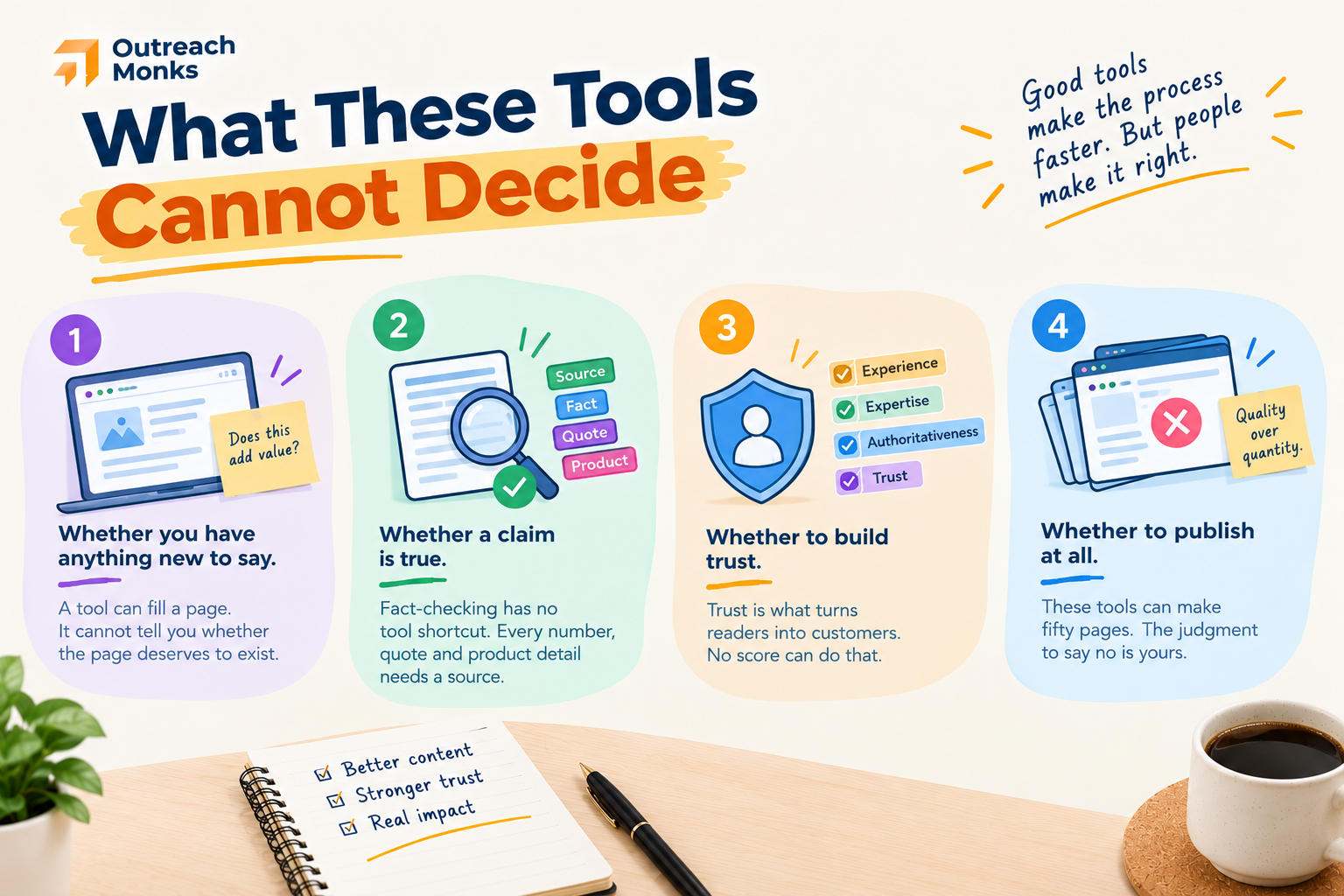
A stack like this makes a good process faster. It does not make a weak one good. These are the judgments that stay with people.
- Whether you have anything new to say. Google’s guidance calls the “why” behind content perhaps the most important question, and says it should be to help people. A tool can fill a page. It cannot tell you whether the page deserves to exist.
- Whether a claim is true. Fact-checking has no tool shortcut. Every number, quote and product detail needs a source.
- Trust. Google says E-E-A-T is not itself a ranking factor and that of its components, trust is most important. Named authors, honest sourcing and accurate claims build trust. No score does.
- Whether to publish at all. These tools can produce fifty pages in an afternoon, which is exactly the pattern the scaled content abuse policy targets. The discipline is in publishing fewer, better pages.
Tools Support the Process, Writers Own the Result
Not every team needs all seven. A lean setup of Search Console, AlsoAsked, an AI assistant and Grammarly costs about $44 a month at entry plans and covers research, drafting, editing and measurement. Add Ahrefs and Surfer when volume justifies them, and Copyscape when you start working with outside writers. Teams doing it themselves on a tight budget may find our guide to DIY SEO a useful companion.
What holds the whole thing together is the part software does not provide: a writer who understands the search intent, an editor who checks the facts, and someone with real expertise to add. At Outreach Monks, that is the part we staff, not automate. If you would rather hand the work to a team built around that split, our content creation service and wider SEO packages pair the same tools with people who own the result.
Frequently Asked Questions
Do SEO agencies use AI to write content?
Many do, mostly for research, outlines, briefs and first drafts, with people handling expertise, accuracy and final edits. Google does not prohibit AI-assisted content. Its guidance says generative AI can be useful for research and structure, and that the problem is producing many pages without adding value, however they are made. Our own position is that AI accelerates the work and does not replace the expertise.
What is the best tool for optimising content for SEO?
It depends on the job. For deciding what to write, a research tool such as Ahrefs. For turning that into a brief and checking coverage, an on-page tool such as Surfer. For learning what happened afterwards, Search Console. No single tool does all three well, and none guarantees rankings. Treat any content score as a guide to coverage, not a measure of how Google will treat the page.
Can AI-written content rank well in search?
It can, when it is accurate, original and useful to the reader. Google says its systems reward helpful, reliable content made for people, and that how content is produced matters less than the value it adds. What does not work is mass-producing thin pages, which falls under the scaled content abuse policy. There is no guarantee for any content, human or AI.
How do you keep AI content from sounding generic?
Put something in that a model cannot supply: expert quotes, first-hand examples, original data, a clear point of view. Then edit hard. Generic output usually means the brief was generic, so a sharper angle and better source material improve the draft more than any prompt trick.
What tools catch duplicate or low-quality content before it is published?
Copyscape catches duplicate text, including against your own library through its private index. Grammarly catches mechanical and clarity problems. Neither measures quality. For that, Google recommends assessing content against its people-first questions, ideally with someone unaffiliated reading it, and an editor checking every factual claim.
How much does an SEO content writing tool stack cost?
At entry plans and one seat, the seven tools here come to about $222 a month plus roughly 21 cents per article for Copyscape. A lean four-tool version costs about $44. Costs rise with seats and usage limits, so check each vendor's current plan terms before committing.