Building high-quality backlinks is one of the most important parts of any strong SEO strategy. However, finding opportunities, analyzing prospects, and managing outreach can quickly become overwhelming without the right tools.
That’s where Chrome extensions for link builders come in — offering quick, powerful shortcuts to handle research, site audits, and outreach directly from your browser. By using the right extensions, you can speed up your link-building workflow, improve your results, and stay competitive in a crowded digital landscape.
In this guide, we’ll explore 13 essential Chrome extensions that every serious link builder should have in their toolkit. Let’s continue reading and learn more!
What are Chrome Extensions for Link Builders?
Chrome extensions for link builders are small browser tools designed to make backlink research, analysis, and outreach faster and easier. They integrate directly into your Chrome browser, giving you instant access to important SEO data without switching between different platforms.
Using Chrome extensions is crucial because link building involves repetitive, time-consuming tasks. Without the right tools, it’s easy to lose time and miss valuable opportunities. The right extensions help you work smarter and stay competitive.
Here’s why they are important:
- Save Time: Speed up backlink analysis, prospecting, and outreach tasks.
- Boost Accuracy: Get real-time data on backlinks, authority, and page metrics.
- Stay Organized: Manage multiple link building campaigns more efficiently.
- Spot Opportunities Faster: Quickly identify high-value backlink prospects.
- Work Smarter: Focus on strategy rather than manual, repetitive tasks.
With the right extensions in place, link building becomes much more manageable and scalable.
13 Best Chrome Extensions for Link Builders
If you’re working on link building, the right Chrome extensions can save you hours and boost your productivity. Here are 13 tools that every smart link builder should check out.
1. MozBar

MozBar is one of the most popular Chrome extensions for link builders and SEO professionals. It provides instant SEO metrics while you browse any webpage, helping you quickly assess link opportunities and analyze site authority.
Best for
Quickly checking Domain Authority (DA), Page Authority (PA), and link metrics while browsing.
Key Features
- View DA, PA, and Spam Score instantly.
- Highlight followed and nofollowed links.
- Analyze on-page elements like titles, meta descriptions, and headings.
- Export link data for deeper analysis.
Price
Free version available. Paid features are included with Moz Pro starting at $49/month.
Using MozBar speeds up the initial research phase by helping you prioritize high-quality link prospects faster.
2. Ahrefs SEO Toolbar

Ahrefs SEO Toolbar is a powerful Chrome extension that gives link builders access to advanced SEO metrics directly in the browser. It pulls live data from Ahrefs, helping you analyze backlinks, authority, and organic performance without leaving the page.
Best for
Deep backlink analysis and understanding a site’s overall SEO strength.
Key Features
- Check URL Rating (UR) and Domain Rating (DR) instantly.
- Analyze backlink profiles directly from the toolbar.
- See keyword metrics like search volume and difficulty.
- Highlight outgoing links (dofollow and nofollow).
Price
Limited free features. Full access is available with an Ahrefs subscription starting at $129/month.
Ahrefs SEO Toolbar is a must-have if you want fast, reliable data while researching link opportunities.
3. Majestic Backlink Analyzer

Majestic Backlink Analyzer is a dedicated Chrome extension for checking backlink profiles directly from your browser. It gives you quick insights into Trust Flow, Citation Flow, and backlink history, helping you evaluate link prospects efficiently.
Best for
Analyzing the trustworthiness and strength of a website’s backlink profile.
Key Features
- View Trust Flow and Citation Flow scores instantly.
- Check the number of external backlinks and referring domains.
- Analyze link profiles without visiting Majestic’s website.
- Spot strong or spammy sites quickly during prospecting.
Price
Limited free data. Full access requires a Majestic subscription starting at $49.99/month.
Majestic is ideal if you focus heavily on link quality and want a second layer of backlink analysis beyond DA or DR scores.
4. Check My Links

Check My Links is a simple but powerful Chrome extension designed to quickly scan any webpage for broken links. It’s a favorite tool among link builders who use broken link building strategies to find outreach opportunities.
Best for
Identifying broken links on webpages to spot backlink opportunities.
Key Features
- Instantly scans all links on a page.
- Highlights valid links in green and broken links in red.
- Easy to use with one-click scanning.
- Helps speed up broken link prospecting.
Price
Completely free to use.
Check My Links makes it fast and easy to find broken links you can offer to replace, opening up valuable link-building opportunities.
5. SEOminion Chrome Extension

SEOminion is a versatile Chrome extension that offers a wide range of SEO tools in one place.
For link builders, it’s especially useful for analyzing on-page SEO, checking internal and external links, and running quick audits.
Best for
Performing quick on-page SEO checks and analyzing link structures.
Key Features
- Analyze all internal and external links on any page.
- Highlight nofollow links easily.
- Check on-page elements like meta tags, headings, and alt texts.
- Google SERP preview and multi-location search simulation.
Price
Completely free to use.
SEOminion is a handy all-in-one tool for link builders who need both link and content insights without switching tools.
6. Woorank Chrome Extension

Woorank Chrome Extension provides a quick SEO audit of any webpage. This highlights important factors like backlinks, usability, and mobile optimization. It’s a helpful tool for link builders to assess the SEO health of potential linking sites before reaching out.
Best for
Running instant SEO audits and spotting link-worthy websites.
Key Features
- Analyze SEO metrics, usability, and technical SEO issues.
- Get insights into mobile responsiveness and page speed.
- Check backlink data and social media signals.
- Identify opportunities to suggest improvements during outreach.
Price
Free version available. Full access with a Woorank subscription starting at $19.99/month.
Using Woorank helps link builders make smarter decisions when choosing outreach targets.
7. Website SEO Checker

Website SEO Checker is a lightweight Chrome extension that gives a fast overview of a site’s SEO health. It’s ideal for link builders who want a quick snapshot of important metrics like backlinks, authority scores, and page optimization.
Best for
Quickly evaluating a site’s SEO strength before outreach.
Key Features:
- Check backlinks, domain authority, and page authority instantly.
- Analyze on-page SEO elements like headings and meta tags.
- Monitor social media metrics connected to the domain.
- Get basic technical SEO insights like mobile friendliness and loading speed.
Price
Free version available. Some advanced features require a paid plan starting at $59/month.
Website SEO Checker helps you qualify good link prospects without needing full site audits every time.
8. Hunter (Email Finder)

Hunter is one of the most popular Chrome extensions for finding professional email addresses associated with any website. It’s a must-have tool for link builders who need reliable contact information for outreach campaigns.
Best for
Finding verified email addresses for link-building outreach.
Key Features
- Discover emails linked to a domain in one click.
- View names, roles, and sources for found emails.
- Verify email deliverability to reduce bounce rates.
- Export email lists for outreach management.
Price
Free plan available with 25 monthly searches. Paid plans start at $49/month.
Hunter makes email outreach faster and more effective by saving you hours of manual research.
9. Voila Norbert (Email Finder)
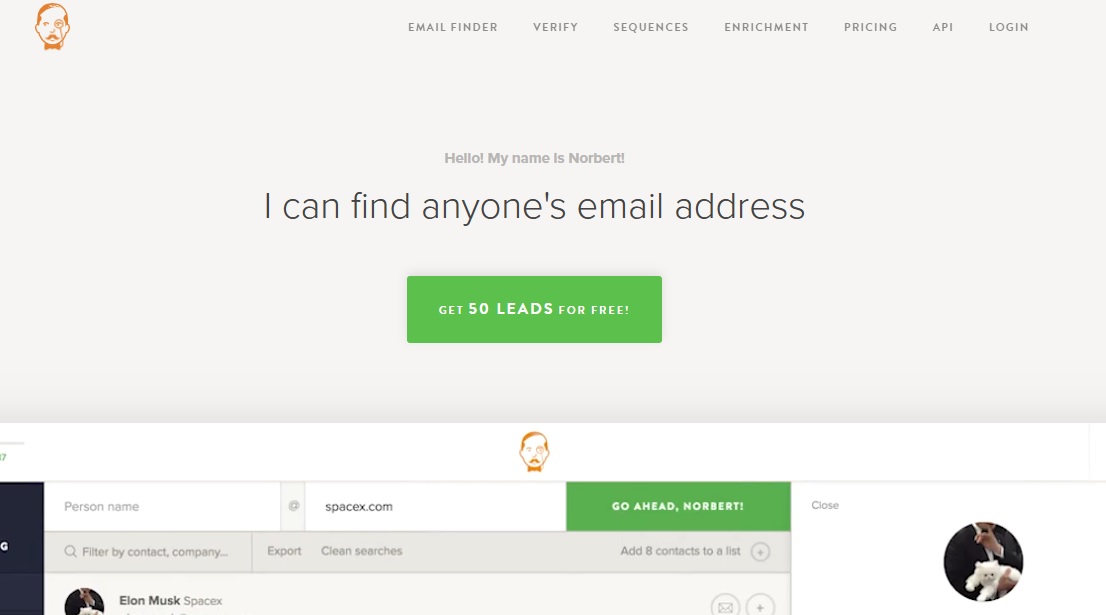
Voila Norbert’s email finder is another powerful Chrome extension for finding verified email addresses with minimal effort. It’s perfect for link builders who want to streamline their outreach process and connect with the right people.
Best for
Quickly finding and verifying emails for link-building outreach.
Key Features
- Find emails by entering a person’s name and domain.
- Verify emails to ensure they are active and valid.
- Integrate easily with outreach tools and CRMs.
- Batch search for multiple emails at once.
Price
Free trial available for up to 50 leads. Paid plans start at $49/month.
Voila Norbert is great for building clean outreach lists and minimizing wasted effort on incorrect contacts.
10. Wayback Machine

Wayback Machine’s Chrome extension lets you view archived versions of any webpage with a single click. It’s especially useful for link builders when checking old content, recovering lost pages, or analyzing sites that have changed over time.
Best for
Finding historical versions of web pages and recovering link opportunities.
Key Features
- Instantly access snapshots of websites from different years.
- Recover dead pages that once had valuable backlinks.
- Monitor how websites have evolved over time.
- Identify content gaps for outreach or guest posting ideas.
Price
Completely free to use.
Wayback Machine helps you spot hidden link-building opportunities and understand the backlink history of a domain.
11. GMass

GMass is a powerful Chrome extension that helps you send personalized mass emails directly from your Gmail account. It’s a favorite tool for link builders who want to manage large-scale outreach campaigns without expensive software.
Best for
Running personalized email outreach campaigns at scale.
Key Features:
- Send mail merges with Gmail and Google Sheets.
- Personalize each email automatically based on the recipient’s details.
- Track opens, clicks, and replies easily.
- Set automatic follow-ups for non-responders.
Price
Plans start at $12/month after a free trial.
GMass makes outreach faster, more organized, and more effective, especially when reaching out to multiple link prospects.
12. Linkclump

Linkclump is a Chrome extension that helps you open, copy, or bookmark multiple links at once by simply dragging a box around them. It’s a great tool for link builders who need to manage large lists of links quickly during prospecting.
Best for
Managing multiple link prospects faster during research.
Key Features
- Open dozens of links in new tabs with one action.
- Copy multiple URLs instantly to your clipboard.
- Bookmark large sets of links for later review.
- Customize actions and shortcuts for faster workflows.
Price
Completely free to use.
Linkclump speeds up the tedious parts of link prospecting, helping you save time and stay organized.
13. LastPass Chrome Extension

LastPass is not strictly an SEO tool, but its value for link builders and digital marketers cannot be understated. The auto-fill feature, in particular, has been a game-changer, allowing instant logins without the need to fetch passwords.
Furthermore, the extension’s ability to integrate across devices means users have access to their passwords whether they’re on their desktop, tablet, or mobile. Standout features of LastPass include:
- Password Vault: Store and manage all your passwords securely in one centralized location.
- Auto-fill: Automatic login to saved sites, ensuring quick access without the need to remember each password.
- Password Generator: Create strong, unique passwords for every account, enhancing security.
- Secure Sharing: Share account access without revealing the password, ideal for team collaboration.
You can check out other password managers, namely Nordpass vs 1password.
Tips to Choose the Best Chrome Extension for Link Building
With so many tools available, it’s important to choose Chrome extensions that match your workflow and goals.
Here are a few tips to help you pick the right ones:
- Match tools to your strategy: Choose based on what you need — backlink checks, email outreach, audits, or link monitoring.
- Check data accuracy: Make sure the tool provides reliable metrics from trusted sources.
- Look for ease of use: Extensions should be simple, fast, and work without slowing down your browser.
- Test free versions first: Many offer free plans or trials — use them before investing in paid versions.
- Avoid clutter: Only install tools you actually use. Too many extensions can slow down your browser and distract you.
Choosing the right set of Chrome extensions will save time, reduce effort, and improve your results across every step of the link building process.
Concluding Thoughts
Link building is challenging, but the right tools can make the process much faster and more effective. Using smart Chrome extensions helps you find better opportunities, work more efficiently, and scale your outreach without wasting time.
Instead of juggling between multiple platforms, you can manage everything from backlink checks to email outreach directly from your browser. The key is choosing tools that fit your specific link building workflow, not just using them because they are popular.
Focus on quality, consistency, and smart automation to build a stronger backlink profile over time.
Frequently Asked Questions
What Features Should I Look for in a Link Building Chrome Extension?
Focus on features like backlink analysis, email discovery, site authority metrics, and link monitoring. Choose extensions that are fast, accurate, and fit easily into your existing workflow.
Are Free Chrome Extensions Good Enough for Link Building?
Yes, many free extensions are very useful, especially for beginners. However, for deeper data and large-scale outreach, you may eventually need paid versions.
Can I Use Multiple Chrome Extensions at the Same Time?
Yes, you can install and use multiple extensions together. Just make sure they don’t slow down your browser or cause conflicts.
How Often Should I Update My Chrome Extensions?
It’s best to update extensions whenever new versions are available. Updates often fix bugs, improve speed, and add better features.
Are Chrome Extensions Safe for Link Building Tasks?
Most extensions from trusted developers are safe. Always check user reviews and permissions before installing any tool.
Do Chrome Extensions Replace Full SEO Tools?
No, they are meant to complement, not replace, full SEO platforms. They provide quick insights, but deeper analysis usually needs complete SEO tools.
Can Chrome Extensions Help with Competitor Link Analysis?
Yes, many extensions like Ahrefs Toolbar and MozBar can reveal competitor backlink profiles. This helps you find new link building opportunities faster.
Is It Better to Use Browser Extensions or Web Apps for Link Building?
Browser extensions are faster for quick tasks like checking backlinks or finding emails. Web apps are better for managing larger, more detailed SEO projects.