

Some Instagram accounts grow fast—and stay that way.
They don’t use ads. Don’t buy followers. They just know how to build the kind of profile people actually want to follow.
That’s the power of organic Instagram followers. These are real people who discover your content on their own, engage with it because it speaks to them, and stick around because they see value. But growing that kind of audience today takes more than just good visuals. Instagram’s algorithm now favors saves, shares, and watch time over likes and comments—so the way we approach content has to change.
You don’t need a bigger budget to grow—you need a smarter Instagram growth strategy. One that’s rooted in content quality, real engagement, and signals that both users and the algorithm trust.
In this guide, we’ll walk through the steps to build that system—one that drives authentic followers, improves content discoverability, and works with the algorithm, not against it.
1. Optimize Your Instagram Profile for Discoverability
Your profile is your storefront. If people (or the algorithm) can’t tell what you do in three seconds, you’re losing organic reach and missing out on followers who are actively searching for what you offer.
A. Use Keywords in the Name Field
Instagram’s name field (not your @handle) is indexed for search. Use it to boost visibility.
- ✅ Instead of: Alex Morgan
- ✅ Try: Alex | Wellness Coach for Women
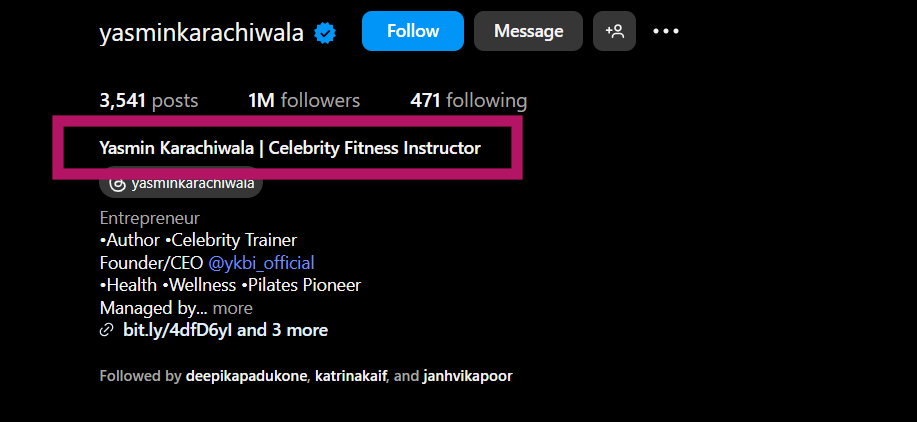
This helps your account appear in more relevant searches—even outside your follower base.
B. Write a Bio That Works for Both People and Search
Your bio should be clear, scroll-stopping, and keyword-rich without sounding robotic.
Structure it like this:
- What you offer (e.g. “Content that drives traffic & sales”)
- Who it’s for (e.g. “For founders, freelancers & marketers”)
- Call-to-action (e.g. “DM ‘GROW’ for strategy tips”)
Use Instagram bio optimization techniques to naturally include relevant terms without keyword stuffing.
C. Choose a Handle That’s Clean and Search-Friendly
- Use a handle that reflects your name or niche
- Avoid complex spellings, random numbers, or symbols
- Make it easy to remember and easy to tag
By making these simple but strategic tweaks, you’re not just improving your profile—you’re setting the foundation
2. Develop a Consistent Content Strategy
You don’t need to post every day to grow—but you do need a system.
Inconsistent posting confuses both your audience and the algorithm. If one week you show up five times, and the next you’re silent, you lose rhythm—and visibility.
A consistent Instagram content strategy builds trust, boosts engagement, and helps the platform surface your posts to more people. It’s one of the most overlooked ways to support your Instagram algorithm strategy.
How to Create a Repeatable Instagram Content Plan
- Define 3–4 Instagram content pillars that align with your niche (e.g. tutorials, behind-the-scenes, testimonials, quick tips)
- Use a healthy mix of formats:
- Reels to expand reach
- Carousels for saves and shares
- Stories for everyday interaction
- Reels to expand reach
- Build an Instagram content calendar to stay organized
- Follow a realistic Instagram post schedule—even 3 quality posts a week can outpace daily posting with no focus
- Use content batching for Instagram to prepare and schedule posts ahead of time
Staying consistent not only makes content creation easier—it helps you boost Instagram engagement without relying on paid promotion or daily guesswork.
3. Prioritize Shares and Saves Over Likes and Comments
Still chasing likes as your main success metric? It might be time to shift gears.
Instagram’s algorithm now gives far more weight to saves and shares—signals that tell the platform your content is not just liked, but valuable enough to revisit or pass along.
These are the two strongest forms of engagement today.
- A share extends your reach beyond your current audience.
- A save tells the algorithm your content is evergreen, useful, and worth keeping.
Likes are still nice. Comments can spark conversation. But if you’re looking to boost content performance on Instagram, shares and saves are what push your posts further—especially to Explore and suggested feeds.
How to Create Content People Want to Save or Share
- Post tips, how-tos, or step-by-step carousels that offer clear takeaways
- Use infographics or short-form guides that solve a specific problem
- Turn one idea into a swipe-through format—perfect for save-worthy content
- Share relatable quotes or data visuals that spark emotion or insights (highly shareable)
Focusing on Instagram engagement metrics that matter now—like saves and shares—not only increases visibility but also tells the algorithm your content is truly valuable.
4. Leverage Instagram SEO for Enhanced Discoverability
If Instagram feels more like a search engine these days—you’re not wrong.
As users increasingly search for content by topic, niche, or keywords, Instagram has quietly evolved its SEO capabilities. That means what you write—not just what you post—can decide how easily people find you.
To boost your Instagram account discoverability, you need to think like a search engine.
How Does Instagram SEO Work?
Instagram looks at several text-based elements to determine what your content is about:
- Your bio and name field
- Your caption text
- The alt text (automatically generated, or written manually)
- Your hashtags and location tags
All of these signals help Instagram categorize your content and show it to users who are searching for related topics—whether in Explore, Reels, or the main search bar.
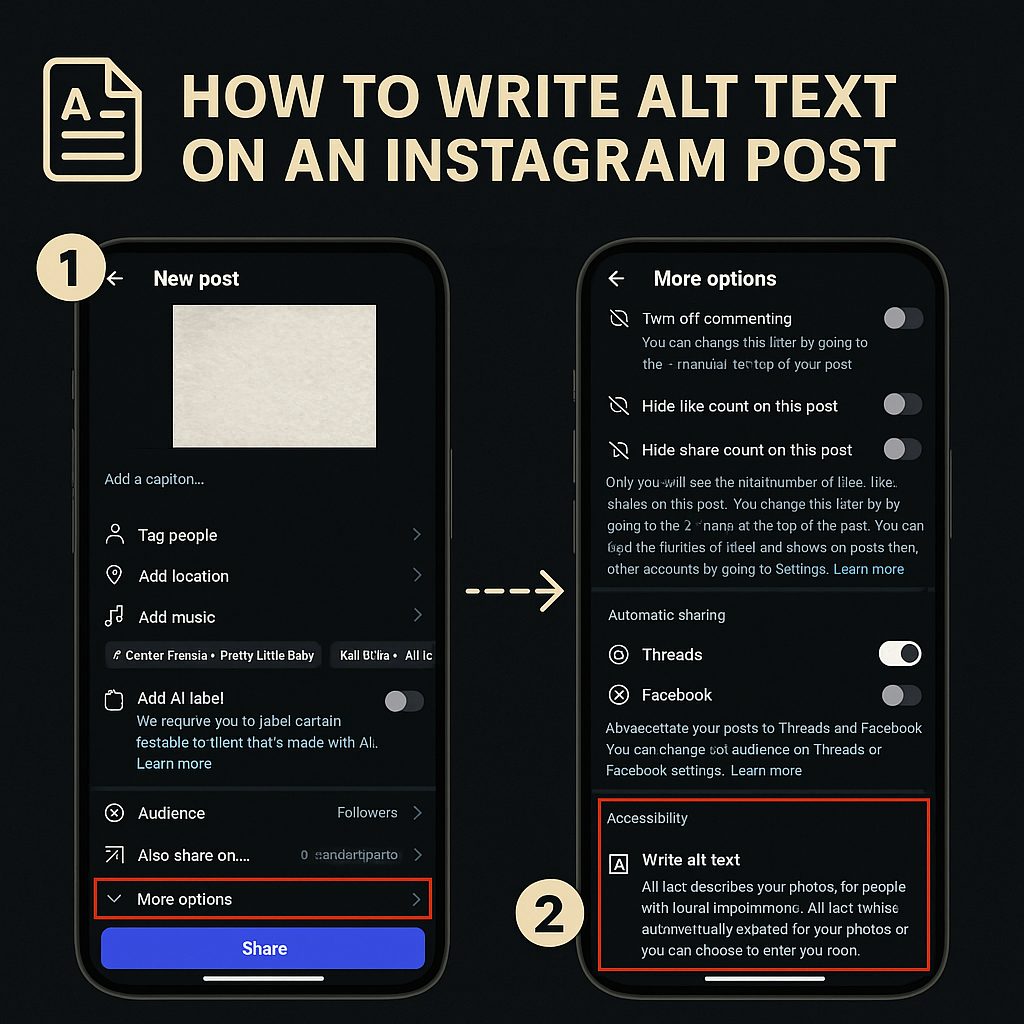
Tips to Improve SEO for Instagram Posts
- Use natural keywords in your captions (e.g. “content tips for freelancers” instead of vague phrases)
- Don’t keyword stuff—write like you speak, but with intent
- Add alt text to important posts, especially educational carousels and product content
- Be consistent with hashtags that align with your niche and audience intent
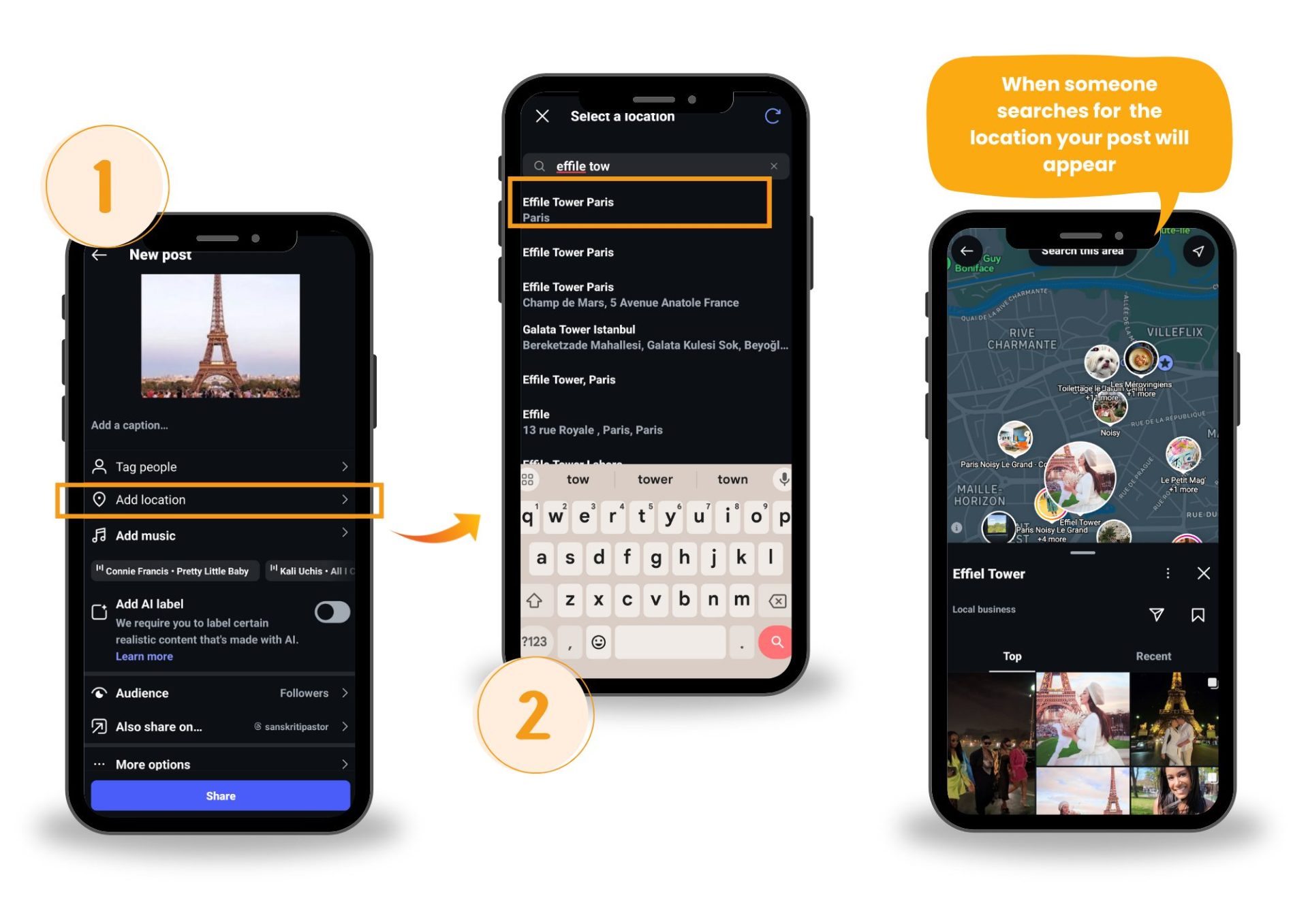
- Use location tags for local relevance or discovery
Optimizing your profile and posts for Instagram search doesn’t mean overhauling your voice—it means making small, smart adjustments that help the algorithm understand your content better. That’s what leads to more visibility—and more organic followers.
5. Utilize Hashtags and Geotags Strategically
Hashtags aren’t dead—but lazy ones are.
If you’re still copying the same 30 hashtags from a saved note, it’s time to rethink your approach. A smart Instagram hashtag strategy can significantly improve your visibility, reach, and post performance—if you use them with intention.
How Do Hashtags Actually Help with Reach?
Hashtags help Instagram categorize your content. When done right, they:
- Increase your chances of appearing in hashtag-based searches
- Push your content into niche communities
- Improve your hashtag visibility on Explore and Reels
But using broad, oversaturated tags like #love or #fashion rarely works. What you need are targeted hashtags that match your content and your audience’s search behavior.
Tips for Effective Hashtag Use
- Mix 3 types: niche-specific, moderately popular, and branded
- Avoid banned or irrelevant tags—they hurt your reach
- Place hashtags at the end of captions (not in comments for SEO)
- Update your hashtag sets every few weeks to avoid spammy patterns
What Are Geotags—and Why Do They Matter?
Geotags are location markers you add to your Instagram posts or Stories. They tell the platform (and your audience) where the content was created or is relevant to.
They’re not just for travel photos. Adding a geotag—even something as simple as your city or a local venue—can:
- Help your post appear in location-based Instagram searches
- Increase reach among users browsing or engaging with content in that area
- Improve your visibility for local communities, businesses, or events
Using the right mix of hashtags and geotags helps Instagram know who to show your content to—and where it’s most relevant. Done well, it’s a free visibility boost you can’t afford to skip.
6. Use Trial Reels to Test Content with New Audiences
Instagram Reels offer the highest reach potential on the platform, especially for creators looking to connect with new followers. Even short-form videos under 30 seconds can land on Explore or Reels feeds—if the content delivers value and keeps people watching.
Think of Reels as your testing lab for content ideas. Low stakes. High exposure.
Why Reels Are Ideal for Content Testing
Reels operate on a different algorithm than feed posts. Here’s why they matter for testing:
- They’re pushed to non-followers first, making them a powerful tool to reach new audiences on Instagram
- The Instagram Reels algorithm evaluates your video based on watch time, replays, shares, and saves—not just likes
- You get real data, fast—which is perfect for testing short-form video strategies
What Is Instagram’s Trial Reels Feature?
Instagram now offers a built-in way to experiment: Trial Reels. This feature allows you to run Instagram Reel experiments before exposing content to your full audience.
Here’s how it works:
- Trial Reels are shown only to non-followers
- They won’t appear on your main feed or Reels tab unless someone shares them
- Your existing followers won’t see it unless it’s directly shared with them
- Only you can see that it’s a trial post
This lets you experiment with content outside your usual niche, test different hooks or storytelling formats, and gather real engagement metrics—all without affecting your regular performance benchmarks.
How to Create and Share a Trial Reel
- Upload your Reel as usual on the Instagram mobile app.
- On the final share screen, toggle the new “Trial” switch.

Once shared:
- You can find your Trial Reel in your profile alongside any drafts.
- Insights, including Views, Likes, Comments, and Shares, are available 24 hours after sharing.
You can:
- Monitor performance using Instagram’s built-in Reels analytics (available after 24 hours)
- Choose to share the Reel publicly if it performs well—or let it expire quietly
- Use results to refine your Instagram content strategy going forward
Using content testing on Instagram through Trial Reels helps you gather honest feedback, test new creative angles, and ultimately grow your audience with short-form video—without risking your current momentum.
7. Implement the 3x3x3 Engagement Strategy
Posting great content is only half the equation. If you’re not actively engaging, the algorithm won’t prioritize your posts—and your reach stays limited.
That’s where the 3x3x3 engagement strategy comes in. It’s simple, repeatable, and designed to boost organic Instagram engagement by training the algorithm to see your account as active and connected.
What Is the 3x3x3 Strategy—and How Does It Work?
Here’s the breakdown:
3 posts, 3 comments, 3 replies—before and after you publish your own content.
- Engage with 3 recent posts from accounts in your niche (like, save, or share)
- Leave 3 thoughtful comments on relevant posts—not just emojis or “Nice post!”
- Reply to 3 recent comments or DMs on your own profile
Do this 15–30 minutes before and again after your new post goes live. This helps send stronger engagement signals to the Instagram algorithm, increasing the likelihood that your content gets pushed to more feeds and Explore.
Why It Works
Instagram favors two-way interaction. When you engage first, you:
- Boost your profile visibility within your niche
- Signal activity to the algorithm, improving post distribution
- Encourage reciprocal engagement from others
Make a shortlist of 10–15 niche-relevant accounts. Rotate through them during your engagement routine to stay visible in the right circles without repeating the same actions daily.
This strategy isn’t about hacking the algorithm—it’s about showing up consistently and meaningfully in your space. When done regularly, it quietly compounds your reach, builds relationships, and helps increase real engagement on Instagram—without spending a dime.
8. Engage Actively with Your Audience
People don’t follow brands—they follow people who talk back.
It’s easy to hit “post” and walk away, but if you’re not actively responding to your audience, you’re missing the point of social media. Engaging in real conversations is one of the fastest ways to build loyalty and increase visibility.
And yes—Instagram’s algorithm watches for it.
How Does Audience Engagement Help Growth?
The more you interact with your followers, the more signals you send to the algorithm that your content is worth surfacing.
Engagement triggers include:
- Replies to DMs and comments
- Comment threads that keep conversations going
- Tagging users back when they mention you
- Liking and replying within minutes of receiving interaction
All of these behaviors help you increase Instagram interactions in ways that feel human—not forced.
Tips to Build Community on Instagram
- Respond to every comment—even short ones
- Use names when replying to DMs (adds a personal touch)
- Ask questions in Stories or captions to start a conversation
- Repost user-generated content and tag them back—it creates trust and momentum
When your audience feels seen, they stick around—and they interact more. That’s how you humanize your Instagram brand, build a real community, and keep your growth steady without relying on luck or algorithms alone.
Even if you’re responding to every comment, fake or inactive followers can skew your metrics and hurt how the algorithm sees your engagement quality.
Use a tool like this Instagram fake follower checker to audit your audience. Clearing out ghost followers makes every interaction count—and helps ensure your content reaches the people who actually care.
9. Switch to a Creator Account for Enhanced Features
Still using a personal account for your content? You’re missing out on tools that could help you grow faster and smarter.
Instagram’s Creator Account is designed specifically for content creators, coaches, public figures, and influencers who want deeper control, better insights, and access to features that support professional growth.
What’s the Difference—and Why Should You Care?
A Creator Account gives you access to powerful tools that a regular personal profile doesn’t, including:
- Detailed insights on content performance, audience growth, and engagement
- Access to Instagram’s Creator Studio for post scheduling and desktop publishing
- Category labels (e.g. Blogger, Coach, Public Figure) that signal your niche to users
- Simplified DM filtering to manage message requests from fans, clients, or leads
- The ability to boost posts or collaborate with brands using branded content tags
This upgrade doesn’t affect your follower count or reach negatively—it just opens the door to smarter growth.
You can switch to a Creator Account under:
Settings > Account > Switch to Professional > Choose “Creator.”
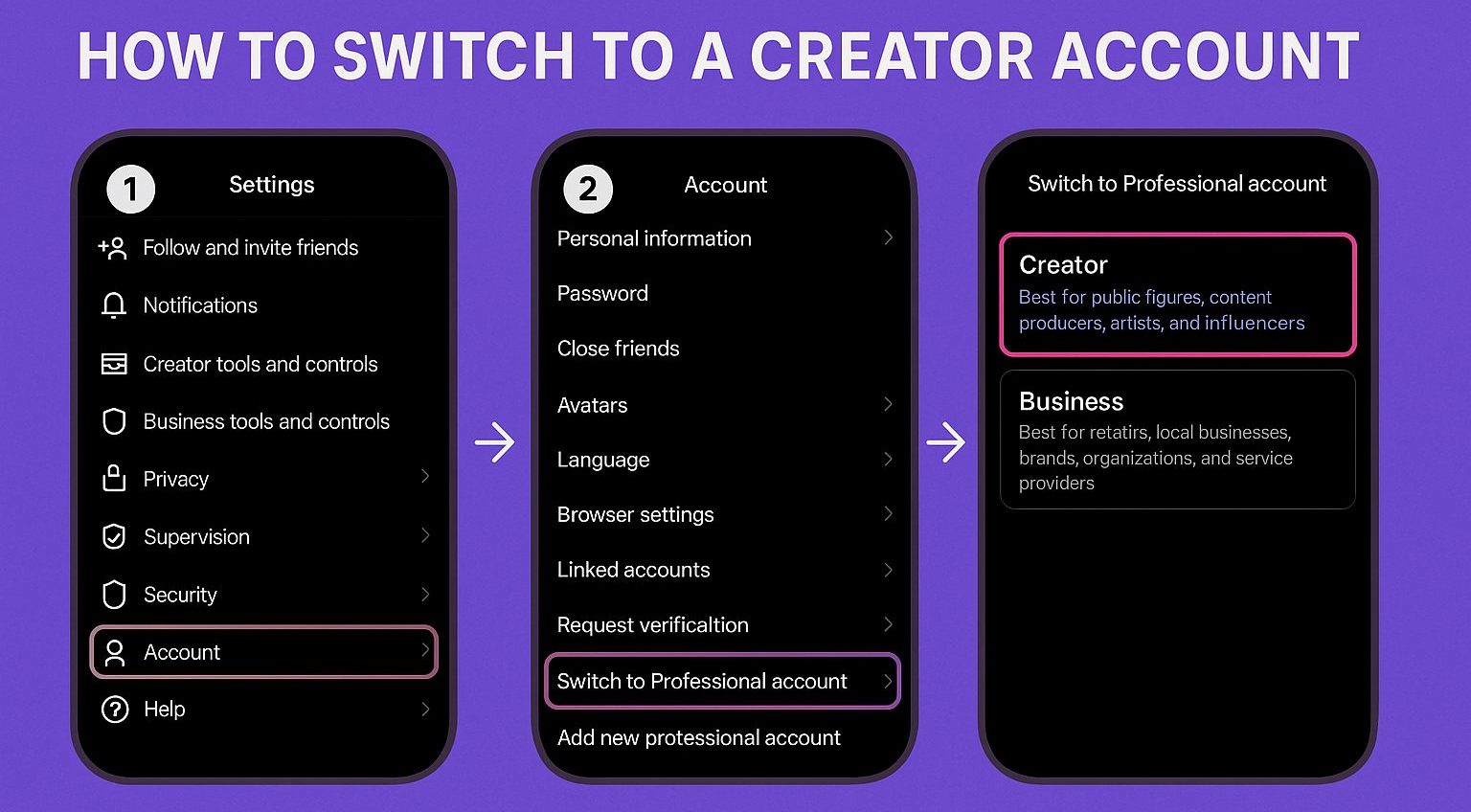
It’s free and reversible at any time.
Switching gives you the tools to optimize your Instagram strategy, track what’s actually working, and start creating content with data—not just instincts.
10. Use Memes and Trend-Driven Posts to Boost Shares
Memes aren’t just punchlines—they’re one of the fastest ways to rack up shares, saves, and reach on Instagram. And when you combine them with Reels, they become a powerful tool for organic content distribution.
Using viral meme Reels for Instagram helps your brand ride cultural momentum, making your content feel relevant and fun—without relying on paid ads.
Why Meme Reels and Trend-Based Posts Drive More Reach
- They blend perfectly with the platform’s visual, fast-paced format
- They reflect everyday humor, making them instantly shareable Instagram content
- Instagram Reels for engagement are favored in the Explore tab and suggested feeds
- They drive tagging and messaging behavior, which boosts visibility organically
If your goal is to increase post performance without more content production time, funny Instagram Reels ideas and trending meme formats offer a shortcut to high ROI.
How to Build a Meme Strategy for Your Brand Without Losing Identity
- Focus on meme strategy for brands—stay true to your voice while adapting to trends
- Use short, recognizable formats: text-over-video, lip-syncs, or reaction Reels
- Hook viewers early—first 2–3 seconds determine retention and algorithm favorability
- Align humor with your brand pillars, not random virality
Zomato uses this tactic consistently. Their Instagram humor marketing pairs trending audios with relatable food moments.

These memes and reels are quick, funny, and deliver brand recall without needing context.
In fact, according to industry case studies, Zomato’s meme-based Reels helped increase engagement rates significantly, even when the brand scaled back traditional ads.
If you’re serious about creating Instagram content that gets shared, humor and trends—delivered through short-form video—are no longer optional. They’re essential.
11. Optimize Posting Times Based on Audience Activity
You could post your best piece of content—and still hear crickets—if your audience isn’t online to see it.
Instagram rewards early engagement. That means the timing of your post can directly impact how far it travels. Understanding your Instagram active hours is one of the simplest ways to boost reach without changing your content.
1. Use Instagram Insights to Find When Your Followers Are Online
Instagram’s built-in analytics help you understand when to post—not just what to post.
- Go to your profile → tap Professional Dashboard → open Insights
- Head to the Audience tab and scroll to see follower activity by hour and day
- Post about 30–60 minutes before the most active times for better initial engagement
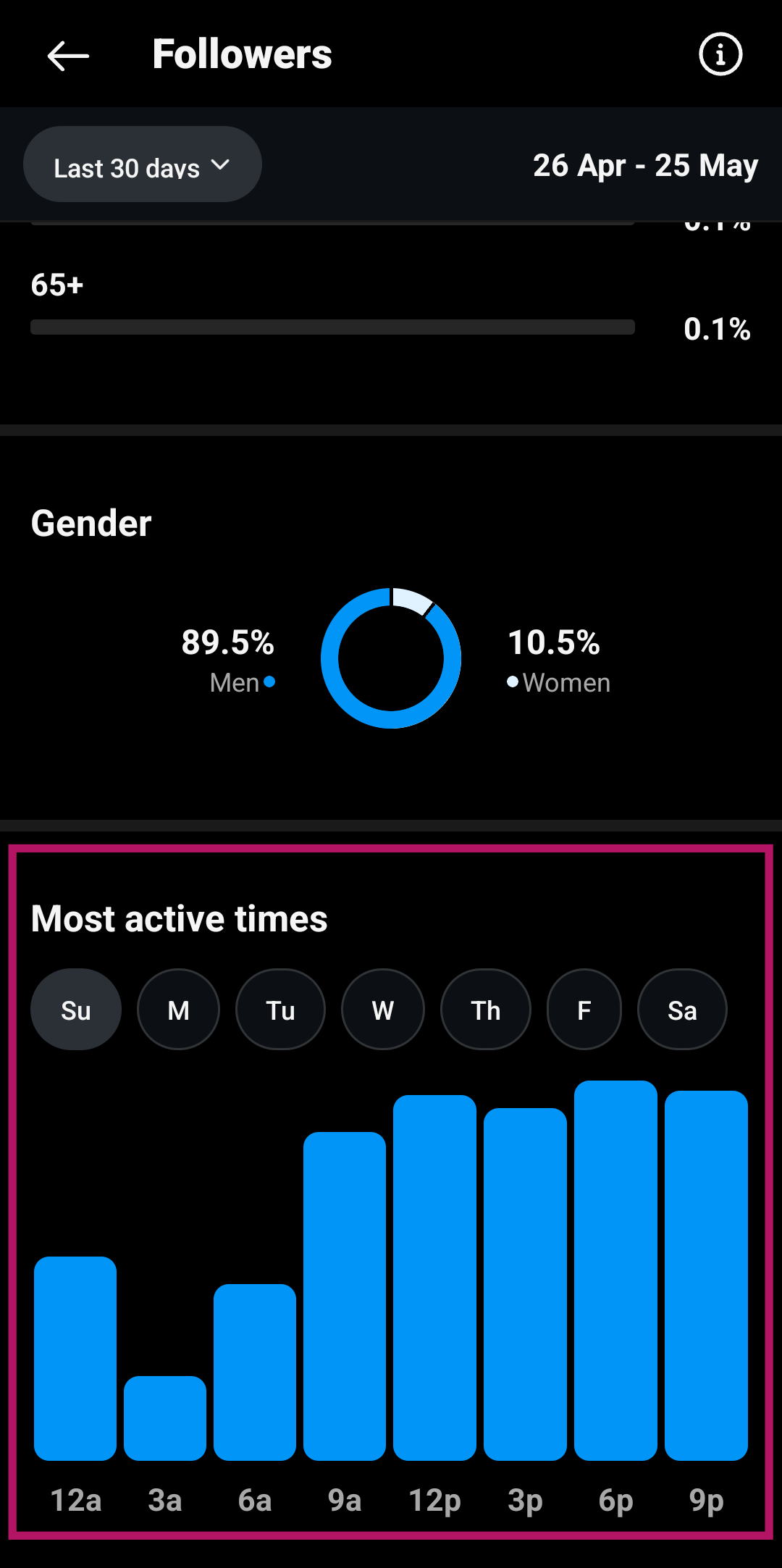
This is one of the most reliable ways to discover your best time to post on Instagram for engagement—using your actual data, not guesswork.
2. Use Scheduling Tools for Smarter Publishing
If you’re managing content regularly, platforms like Later, Sprout Social, or Hootsuite can help:
- Provide deeper Instagram Insights analytics
- Suggest optimized time slots based on past performance
- Let you schedule across multiple time zones
- Track which posts perform best at which hours
These Instagram scheduling tools (2025 updates included) are ideal for creators managing multiple formats—like Reels, Stories, and carousels—on a weekly basis.
3. Follow General Timing Benchmarks—Then Test Your Own
General trends can be a useful starting point. For example:
- Midweek (Wednesday/Thursday) tends to see more engagement
- Peak hours are often 9–11 AM, 12–3 PM, and 7–10 PM
- Lunch breaks and late evenings