Outreach Monks

Top 12 Chrome Extensions for Link Builders: You Need Now

Chrome Extensions

Building high-quality backlinks is one of the most important parts of any strong SEO strategy. However, finding opportunities, analyzing prospects, and managing outreach can quickly become overwhelming without the right tools.

That’s where Chrome extensions for link builders come in — offering quick, powerful shortcuts to handle research, site audits, and outreach directly from your browser. By using the right extensions, you can speed up your link-building workflow, improve your results, and stay competitive in a crowded digital landscape.

In this guide, we’ll explore 13 essential Chrome extensions that every serious link builder should have in their toolkit. Let’s continue reading and learn more!

What are Chrome Extensions for Link Builders?

Chrome extensions for link builders are small browser tools designed to make backlink research, analysis, and outreach faster and easier. They integrate directly into your Chrome browser, giving you instant access to important SEO data without switching between different platforms.

Using Chrome extensions is crucial because link building involves repetitive, time-consuming tasks. Without the right tools, it’s easy to lose time and miss valuable opportunities. The right extensions help you work smarter and stay competitive.

Here’s why they are important:

  • Save Time: Speed up backlink analysis, prospecting, and outreach tasks.
  • Boost Accuracy: Get real-time data on backlinks, authority, and page metrics.
  • Stay Organized: Manage multiple link building campaigns more efficiently.
  • Spot Opportunities Faster: Quickly identify high-value backlink prospects.
  • Work Smarter: Focus on strategy rather than manual, repetitive tasks.

With the right extensions in place, link building becomes much more manageable and scalable.

13 Best Chrome Extensions for Link Builders

If you’re working on link building, the right Chrome extensions can save you hours and boost your productivity. Here are 13 tools that every smart link builder should check out.

1. MozBar

Mozbar Chrome Extension

MozBar is one of the most popular Chrome extensions for link builders and SEO professionals. It provides instant SEO metrics while you browse any webpage, helping you quickly assess link opportunities and analyze site authority.

Best for

Quickly checking Domain Authority (DA), Page Authority (PA), and link metrics while browsing.

Key Features

  • View DA, PA, and Spam Score instantly.
  • Highlight followed and nofollowed links.
  • Analyze on-page elements like titles, meta descriptions, and headings.
  • Export link data for deeper analysis.

Price

Free version available. Paid features are included with Moz Pro starting at $49/month.

Using MozBar speeds up the initial research phase by helping you prioritize high-quality link prospects faster.

2. Ahrefs SEO Toolbar

Ahrefs SEOToolbar Chrome Extension

Ahrefs SEO Toolbar is a powerful Chrome extension that gives link builders access to advanced SEO metrics directly in the browser. It pulls live data from Ahrefs, helping you analyze backlinks, authority, and organic performance without leaving the page.

Best for

Deep backlink analysis and understanding a site’s overall SEO strength.

Key Features

  • Check URL Rating (UR) and Domain Rating (DR) instantly.
  • Analyze backlink profiles directly from the toolbar.
  • See keyword metrics like search volume and difficulty.
  • Highlight outgoing links (dofollow and nofollow).

Price

Limited free features. Full access is available with an Ahrefs subscription starting at $129/month.

Ahrefs SEO Toolbar is a must-have if you want fast, reliable data while researching link opportunities.

3. Majestic Backlink Analyzer

Majestic

Majestic Backlink Analyzer is a dedicated Chrome extension for checking backlink profiles directly from your browser. It gives you quick insights into Trust Flow, Citation Flow, and backlink history, helping you evaluate link prospects efficiently.

Best for

Analyzing the trustworthiness and strength of a website’s backlink profile.

Key Features

  • View Trust Flow and Citation Flow scores instantly.
  • Check the number of external backlinks and referring domains.
  • Analyze link profiles without visiting Majestic’s website.
  • Spot strong or spammy sites quickly during prospecting.

Price

Limited free data. Full access requires a Majestic subscription starting at $49.99/month.

Majestic is ideal if you focus heavily on link quality and want a second layer of backlink analysis beyond DA or DR scores.

4. Check My Links

Check my links Chrome extension

Check My Links is a simple but powerful Chrome extension designed to quickly scan any webpage for broken links. It’s a favorite tool among link builders who use broken link building strategies to find outreach opportunities.

Best for

Identifying broken links on webpages to spot backlink opportunities.

Key Features

  • Instantly scans all links on a page.
  • Highlights valid links in green and broken links in red.
  • Easy to use with one-click scanning.
  • Helps speed up broken link prospecting.

Price

Completely free to use.

Check My Links makes it fast and easy to find broken links you can offer to replace, opening up valuable link-building opportunities.

5. SEOminion Chrome Extension

SEOminion Chrome Extension

SEOminion is a versatile Chrome extension that offers a wide range of SEO tools in one place.
For link builders, it’s especially useful for analyzing on-page SEO, checking internal and external links, and running quick audits.

Best for

Performing quick on-page SEO checks and analyzing link structures.

Key Features

  • Analyze all internal and external links on any page.
  • Highlight nofollow links easily.
  • Check on-page elements like meta tags, headings, and alt texts.
  • Google SERP preview and multi-location search simulation.

Price

Completely free to use.

SEOminion is a handy all-in-one tool for link builders who need both link and content insights without switching tools.

6. Woorank Chrome Extension

Woorank

Woorank Chrome Extension provides a quick SEO audit of any webpage. This highlights important factors like backlinks, usability, and mobile optimization. It’s a helpful tool for link builders to assess the SEO health of potential linking sites before reaching out.

Best for

Running instant SEO audits and spotting link-worthy websites.

Key Features

Price

Free version available. Full access with a Woorank subscription starting at $19.99/month.

Using Woorank helps link builders make smarter decisions when choosing outreach targets.

7. Website SEO Checker

Website SEO Checker

Website SEO Checker is a lightweight Chrome extension that gives a fast overview of a site’s SEO health. It’s ideal for link builders who want a quick snapshot of important metrics like backlinks, authority scores, and page optimization.

Best for

 Quickly evaluating a site’s SEO strength before outreach.

Key Features:

Price

Free version available. Some advanced features require a paid plan starting at $59/month.

Website SEO Checker helps you qualify good link prospects without needing full site audits every time.

8. Hunter (Email Finder)

Hunter.io homepage

Hunter is one of the most popular Chrome extensions for finding professional email addresses associated with any website. It’s a must-have tool for link builders who need reliable contact information for outreach campaigns.

Best for

Finding verified email addresses for link-building outreach.

Key Features

  • Discover emails linked to a domain in one click.
  • View names, roles, and sources for found emails.
  • Verify email deliverability to reduce bounce rates.
  • Export email lists for outreach management.

Price

Free plan available with 25 monthly searches. Paid plans start at $49/month.

Hunter makes email outreach faster and more effective by saving you hours of manual research.

9. Voila Norbert (Email Finder)
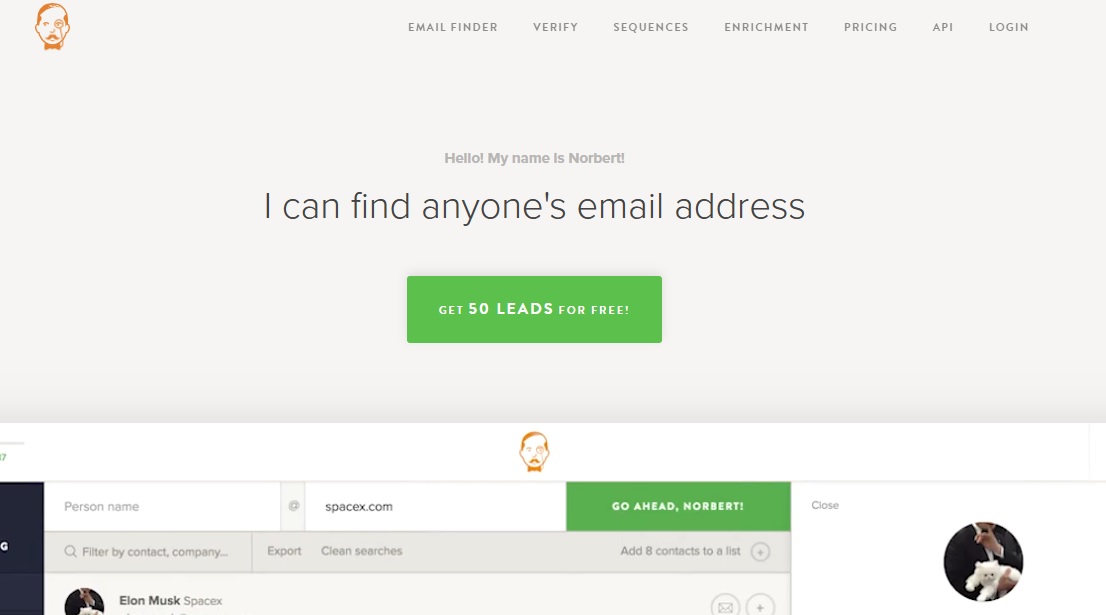
Voila Nobert Email Finder

Voila Norbert’s email finder is another powerful Chrome extension for finding verified email addresses with minimal effort. It’s perfect for link builders who want to streamline their outreach process and connect with the right people.

Best for

Quickly finding and verifying emails for link-building outreach.

Key Features

  • Find emails by entering a person’s name and domain.
  • Verify emails to ensure they are active and valid.
  • Integrate easily with outreach tools and CRMs.
  • Batch search for multiple emails at once.

Price

Free trial available for up to 50 leads. Paid plans start at $49/month.

Voila Norbert is great for building clean outreach lists and minimizing wasted effort on incorrect contacts.

10. Wayback Machine

wayback machine

Wayback Machine’s Chrome extension lets you view archived versions of any webpage with a single click. It’s especially useful for link builders when checking old content, recovering lost pages, or analyzing sites that have changed over time.

Best for

Finding historical versions of web pages and recovering link opportunities.

Key Features

  • Instantly access snapshots of websites from different years.
  • Recover dead pages that once had valuable backlinks.
  • Monitor how websites have evolved over time.
  • Identify content gaps for outreach or guest posting ideas.

Price

Completely free to use.

Wayback Machine helps you spot hidden link-building opportunities and understand the backlink history of a domain.

11. GMass

Gmass

GMass is a powerful Chrome extension that helps you send personalized mass emails directly from your Gmail account. It’s a favorite tool for link builders who want to manage large-scale outreach campaigns without expensive software.

Best for

Running personalized email outreach campaigns at scale.

Key Features:

  • Send mail merges with Gmail and Google Sheets.
  • Personalize each email automatically based on the recipient’s details.
  • Track opens, clicks, and replies easily.
  • Set automatic follow-ups for non-responders.

Price

Plans start at $12/month after a free trial.

GMass makes outreach faster, more organized, and more effective, especially when reaching out to multiple link prospects.

12. Linkclump

Linkclump Chrome Extension

Linkclump is a Chrome extension that helps you open, copy, or bookmark multiple links at once by simply dragging a box around them. It’s a great tool for link builders who need to manage large lists of links quickly during prospecting.

Best for

Managing multiple link prospects faster during research.

Key Features

  • Open dozens of links in new tabs with one action.
  • Copy multiple URLs instantly to your clipboard.
  • Bookmark large sets of links for later review.
  • Customize actions and shortcuts for faster workflows.

Price

Completely free to use.

Linkclump speeds up the tedious parts of link prospecting, helping you save time and stay organized.

13. LastPass Chrome Extension

LastPass Chrome Extension

LastPass is not strictly an SEO tool, but its value for link builders and digital marketers cannot be understated. The auto-fill feature, in particular, has been a game-changer, allowing instant logins without the need to fetch passwords.

Furthermore, the extension’s ability to integrate across devices means users have access to their passwords whether they’re on their desktop, tablet, or mobile. Standout features of LastPass include:

  • Password Vault: Store and manage all your passwords securely in one centralized location.
  • Auto-fill: Automatic login to saved sites, ensuring quick access without the need to remember each password.
  • Password Generator: Create strong, unique passwords for every account, enhancing security.
  • Secure Sharing: Share account access without revealing the password, ideal for team collaboration.

You can check out other password managers, namely Nordpass vs 1password.

Tips to Choose the Best Chrome Extension for Link Building

With so many tools available, it’s important to choose Chrome extensions that match your workflow and goals.
Here are a few tips to help you pick the right ones:

  • Match tools to your strategy: Choose based on what you need — backlink checks, email outreach, audits, or link monitoring.
  • Check data accuracy: Make sure the tool provides reliable metrics from trusted sources.
  • Look for ease of use: Extensions should be simple, fast, and work without slowing down your browser.
  • Test free versions first: Many offer free plans or trials — use them before investing in paid versions.
  • Avoid clutter: Only install tools you actually use. Too many extensions can slow down your browser and distract you.

Choosing the right set of Chrome extensions will save time, reduce effort, and improve your results across every step of the link building process.

Concluding Thoughts

Link building is challenging, but the right tools can make the process much faster and more effective. Using smart Chrome extensions helps you find better opportunities, work more efficiently, and scale your outreach without wasting time.

Instead of juggling between multiple platforms, you can manage everything from backlink checks to email outreach directly from your browser. The key is choosing tools that fit your specific link building workflow, not just using them because they are popular.

Focus on quality, consistency, and smart automation to build a stronger backlink profile over time.

Frequently Asked Questions

What Features Should I Look for in a Link Building Chrome Extension?

Focus on features like backlink analysis, email discovery, site authority metrics, and link monitoring. Choose extensions that are fast, accurate, and fit easily into your existing workflow.

Are Free Chrome Extensions Good Enough for Link Building?

Yes, many free extensions are very useful, especially for beginners. However, for deeper data and large-scale outreach, you may eventually need paid versions.

Can I Use Multiple Chrome Extensions at the Same Time?

Yes, you can install and use multiple extensions together. Just make sure they don’t slow down your browser or cause conflicts.

How Often Should I Update My Chrome Extensions?

It’s best to update extensions whenever new versions are available. Updates often fix bugs, improve speed, and add better features.

Are Chrome Extensions Safe for Link Building Tasks?

Most extensions from trusted developers are safe. Always check user reviews and permissions before installing any tool.

Do Chrome Extensions Replace Full SEO Tools?

No, they are meant to complement, not replace, full SEO platforms. They provide quick insights, but deeper analysis usually needs complete SEO tools.

Can Chrome Extensions Help with Competitor Link Analysis?

Yes, many extensions like Ahrefs Toolbar and MozBar can reveal competitor backlink profiles. This helps you find new link building opportunities faster.

Is It Better to Use Browser Extensions or Web Apps for Link Building?

Browser extensions are faster for quick tasks like checking backlinks or finding emails. Web apps are better for managing larger, more detailed SEO projects.
40+ SEO FAQs You Should Know as a Beginner in 2026

SEO FAQs You Should Know as a Beginner!

When someone starts doing SEO for their website or business, they often come across tons of questions, and it’s easy to get confused.

What tools to use? What actually helps rankings? What’s outdated advice? It can feel like a lot at once.

But here’s the thing: once you understand the basics, SEO doesn’t have to be complicated. With clear answers to the right questions, you can build a solid foundation and move forward with confidence.

In this SEO FAQ guide, we’ve grouped the questions into simple sections, from basic to advanced, so you can easily find the answers you’re looking for and get the help you need at every stage. 

Let’s dive in and clear the confusion.

The Basic SEO FAQs

Before you dive into advanced tactics, it’s important to understand the fundamentals. These beginner-friendly questions will help you grasp what SEO is, why it matters, and how it has evolved over time.

1. Is SEO Still Important in 2026?

Yes, SEO is more crucial than ever in 2026.

More than 68% of online experiences start with a search engine, making SEO the key to gaining visibility and organic traffic. While search algorithms have become smarter, the core goal remains the same: helping users find the best, most relevant information quickly.

Good SEO today focuses on delivering valuable content, smooth site experiences, and answering real user intent, not just stuffing keywords.

Without strong SEO, even a great website can stay invisible. It’s like opening a fantastic store but hiding it in a back alley where no one can find it.

2. What Are The Top SEO Trends Right Now?

SEO is undergoing significant transformations due to advancements in AI and changes in user behavior. Here are the key trends shaping the landscape:​

1. AI Overviews and Generative Search

Google’s AI Overviews (formerly Search Generative Experience) now appear in approximately 15% of search results, providing AI-generated summaries directly on the SERP. This shift has led to an 18–64% decrease in organic clicks for affected queries. 

To adapt:​

  • Optimize content for E-E-A-T (Experience, Expertise, Authoritativeness, Trustworthiness) signals.
  • Provide clear, concise answers to user queries.
  • Use structured data to enhance content visibility.

2. Emphasis on First-Hand Experience

How Google Evaluates EEAT

Google’s addition of “Experience” to its E-E-A-T framework underscores the importance of content created by individuals with direct knowledge. To leverage this:​

  • Share personal insights, case studies, and real-world examples.
  • Highlight author credentials and expertise.
  • Encourage user-generated content and testimonials.​

3. AI-Assisted Content Creation

AI tools are increasingly used to generate content, but uniqueness and depth remain crucial. To ensure quality:

  • Use AI for drafting, but add unique insights and data.
  • Avoid over-reliance on AI to prevent generic content.
  • Regularly update and fact-check AI-generated content.​

4. Addressing Zero-Click Searches

With more users obtaining answers directly from SERPs, zero-click searches are on the rise. To maintain visibility:​

  • Optimize for featured snippets and rich results.
  • Use clear headings and bullet points to enhance readability.
  • Implement FAQ sections to address common queries.​

3. How Long Does It Take To See SEO Results?

On average, it takes about 3 to 6 months to start seeing noticeable SEO results, but it can vary based on many factors.

If your website is new or you’re operating in a highly competitive niche, it might take even longer. Factors like domain age, content quality, backlink strength, and technical SEO health all impact how quickly you rank. SEO is a long-term investment. It’s more like growing a tree than flipping a switch.

Consistency, patience, and adapting your strategies based on performance data are key to sustainable growth.

4. What Are The Main SEO Ranking Factors?

Several key factors influence how well your website ranks on Google and other search engines.
In 2026, the most important SEO ranking factors include:

  • High-Quality Content: Content that is original, helpful, and satisfies user intent.
  • Backlinks: Earning links from reputable and relevant websites.
  • Page Experience: A fast-loading, mobile-friendly site with easy navigation.
  • Keyword Optimization: Using the right keywords naturally in your titles, headers, and content.
  • Technical SEO: Proper indexing, clean URL structure, SSL security, and structured data.
  • User Engagement Metrics: Time on site, click-through rate (CTR), and bounce rate.
  • E-E-A-T Signals: Demonstrating Experience, Expertise, Authoritativeness, and Trustworthiness.

🔹 Quick stat: Pages with high-quality backlinks rank 3.8 times better than those without them.

Remember, no single factor guarantees success. SEO works best when all these elements come together.

5. What is SEO in Digital Marketing?

SEO, or Search Engine Optimization, is a key part of digital marketing. It’s the process of making your website more visible in search engine results, so you can attract more visitors without paying for ads.

While other digital marketing tactics like social media or paid ads bring traffic, SEO focuses on earning organic traffic, which is people who find you naturally through search.

Good SEO strengthens your brand presence, builds trust, and delivers steady results. It’s like planting seeds that grow into a strong digital footprint for your business or personal brand.

6. What Is SERP And Why Does It Matter?

SERP stands for Search Engine Results Page, the page you see after typing a query into Google or another search engine. It shows a mix of results like organic listings, paid ads, featured snippets, videos, local packs, and more.

Ranking higher on the SERP is critical because most users don’t scroll beyond the first page. In fact, over 90% of searchers never go past page one.

The higher your site appears on the SERP, the more visibility, traffic, and potential customers you can attract without paying for ads.

A strong SEO strategy aims not just to appear on the SERP but to stand out with rich features like snippets or sitelinks.

7. How Has SEO Evolved Over The Years?

SEO has changed massively since the early 2000s.

In the beginning, ranking was mostly about stuffing keywords and getting as many backlinks as possible — even if they were low-quality. But today, SEO is all about helping users by providing relevant, high-quality content and great experiences.

Big changes over the years include:

Google Updates List of Major SEO Changes

  • Google’s Panda update (2011) — punished thin, low-quality content.
  • Penguin update (2012) — cracked down on spammy backlinks.
  • RankBrain (2015) — brought AI into search, focusing on search intent.
  • Helpful Content Update (2022 and beyond) — rewards people-first content.

Now, SEO focuses on intent, trustworthiness, user experience, and adapting to new tech like AI and voice search.

In short, SEO has evolved from gaming the system to serving the user.

8. Who Really Needs SEO?

Almost anyone with an online presence needs SEO. Whether you’re running a blog, an ecommerce store, a local business, or even a personal portfolio, SEO helps people find you.

For example, a small bakery needs local SEO to show up when someone searches “best cupcakes near me,” while a tech blogger needs SEO to reach readers looking for gadget reviews.

Without SEO, even amazing websites can remain invisible in the sea of online competition. In short, if you want more visibility, trust, and organic growth online, you absolutely need SEO.

9. Why Is SEO Essential For Every Website?

SEO is essential because it helps your website get discovered by the right audience. Without SEO, even the best-designed website can stay hidden in search engines. Good SEO brings in targeted traffic. People actively searching for what you offer, which increases your chances of getting leads, sales, or readers.

Plus, SEO improves user experience by making your site faster, easier to navigate, and more trustworthy.

🔹 Quick stat: Websites on the first page of Google capture over 71% of search traffic clicks.
If you want long-term success without always paying for ads, SEO is non-negotiable.

FAQs Related to SEO Strategies and Techniques

Now that you know why SEO matters, let’s explore some strategies and techniques that can actually boost your rankings. These FAQs will guide you on where to start and how to build a strong SEO foundation.

10. What Are The Top Techniques To Boost SEO?

To boost your SEO, focus on strategies that truly match user needs and Google’s evolving standards. Here are some top techniques:

  • Create High-Quality Content: Focus on helpful, original, and well-researched content.
  • Build Authoritative Backlinks: Earn links from trusted, niche-relevant websites.
  • Improve Page Speed: A faster site improves both rankings and user experience.
  • Optimize for Mobile: Over 60% of searches now happen on mobile devices.
  • Use Structured Data: Help search engines better understand and display your content.
  • Focus on E-E-A-T: Showcase Experience, Expertise, Authoritativeness, and Trustworthiness.

Remember, real SEO success comes from consistent effort, not quick tricks.

11. Where Should I Begin My SEO Journey?

If you’re new to SEO, the best place to start is by mastering the basics.
Focus first on these core areas:

  • Keyword Research: Find out what your audience is searching for.
  • On-Page SEO: Optimize your titles, headings, URLs, and meta descriptions.
  • Content Creation: Publish helpful, original content that answers user queries.
  • Technical SEO: Ensure your site loads fast, is mobile-friendly, and is easy to navigate.
  • Backlink Building: Start earning links from relevant, trusted websites.

🔹 Tip: Use beginner-friendly tools like Google Search Console and Ubersuggest to track your early progress. Starting with the right foundation will make every future SEO effort easier and more effective.

12. How Can I Make My Website Rank Higher On Google?

Ranking higher on Google takes a mix of smart strategies and consistent effort.
Here’s what you should focus on:

  • Target the Right Keywords: Use terms your audience is actively searching for.
  • Create Helpful Content: Answer real questions better than your competitors.
  • Earn Quality Backlinks: Links from reputable sites signal trust to Google.
  • Boost Site Speed: A faster website improves both rankings and user experience.
  • Mobile Optimization: Make sure your site looks and works great on smartphones.

🔹 Stat: Websites that load within 2 seconds have higher rankings and 53% lower bounce rates. Focus on helping users first, and rankings will follow naturally

13. After Ranking Well, Do I Still Need SEO?

Yes, even after ranking well, SEO is still necessary. Search engines constantly update their algorithms, and competitors are always trying to outrank you. If you stop maintaining your SEO, your rankings can slowly drop over time.

Ongoing SEO means:

  • Refreshing content to stay updated and relevant.
  • Monitoring performance for any sudden drops or new opportunities.
  • Building new backlinks to strengthen authority.
  • Adapting to new Google updates, like AI changes or mobile-first indexing.

Reaching your SEO goal is great, but staying there takes regular effort.

14. How Important Is Updating Content For SEO?

Updating your content is critical for long-term SEO success. Google favors fresh, accurate information — especially for topics that change over time, like technology, health, or finance. Even evergreen content can lose rankings if competitors publish more up-to-date versions.

Refreshing content can include:

  • Adding new statistics, examples, or case studies.
  • Fixing outdated information or broken links.
  • Expanding sections to better answer search intent.
  • Updating keywords to match current search trends.

🔹 Quick stat: Websites that update old posts can boost organic traffic by up to 106%.

Keeping your content fresh signals to Google (and your readers) that your site is active, trustworthy, and worth ranking higher.

SEO Technical Concepts FAQs

Now that you know the strategies, it’s time to understand the technical side of SEO. These FAQs will help you grasp important concepts like backlinks, website structure, and technical health. 

15. What Is a Backlink In SEO And Why Is It Important?

A backlink is when another website links to yours. If trusted websites link to your content, search engines see your site as more credible and valuable.

Backlinks are important because:

  • They boost your authority in Google’s eyes.
  • They drive referral traffic from other sites.
  • They help new content get discovered faster.

🔹 Quick stat: Pages with high-quality backlinks rank significantly higher — about 3.8 times better — than those without strong links.

Building backlinks naturally through valuable content, guest posting, or partnerships is one of the most powerful SEO strategies today.

16. What Are The Different Types Of Website Traffic?

Website traffic is generally divided into a few major types:

  • Organic Traffic: Visitors who find your site through search engines like Google.
  • Direct Traffic: People who type your URL directly into their browser.
  • Referral Traffic: Visitors who come through links on other websites.
  • Social Traffic: Visitors from social media platforms like Facebook, Instagram, or LinkedIn.
  • Paid Traffic: Visitors who arrive through paid ads like Google Ads or social media campaigns.

Organic search still drives over 53% of total website traffic across industries. Understanding traffic types helps you plan better marketing strategies and measure where your growth is coming from.

17. What Is Domain Authority, And How Does It Affect Rankings?

Domain Authority (DA) is a score developed by Moz that predicts how likely a website is to rank in search engine results. It’s measured on a scale from 1 to 100 — the higher the score, the stronger the site’s potential to rank.

Domain Authority is influenced by:

  • The quality and quantity of backlinks.
  • The age and trustworthiness of the domain.
  • The site’s overall SEO performance.

Google doesn’t use Domain Authority as an official ranking factor. But strong DA often correlates with better rankings because it reflects a site’s authority and backlink profile.

Focusing on building real authority through quality content and ethical link building helps improve both DA and actual search visibility.

18. What Are Crawl Errors And How Can I Fix Them?

Crawl errors occur when a search engine tries to access a page on your website but fails. This can stop your pages from being indexed properly and hurt your rankings.

Common causes include broken links (404 errors), server issues (5xx errors), incorrect redirects, or pages blocked by your robots.txt file. To fix crawl errors, you should regularly monitor your site using tools like Google Search Console, repair broken links, ensure your server stays responsive, set up correct redirects, and review your robots.txt and sitemap files.

Keeping your site error-free ensures search engines can crawl and index your content smoothly.

19. What Is Structured Data Markup In SEO?

Structured data markup is a type of code that you add to your website to help search engines better understand your content. It uses a standard format (like Schema.org vocabulary) to describe information, such as articles, products, reviews, events, and more.

When search engines can easily read this structured information, they are more likely to display rich results, such as star ratings, FAQs, and product prices, directly on the search results page. Structured data doesn’t directly boost rankings, but it can increase your click-through rate and visibility by making your listing more attractive.

20. How Does Website Speed Impact SEO?

Website speed plays a major role in SEO because both users and search engines expect fast-loading pages. A slow website frustrates visitors, increases bounce rates, and lowers engagement — all of which can hurt your rankings.

Google has confirmed that page speed is a direct ranking factor, especially with its focus on Core Web Vitals. This measures how quickly and smoothly a page loads and becomes usable.

Sites that load within two to three seconds perform much better in search results and retain users longer. Optimizing images, minimizing code, using reliable hosting, and enabling caching are some effective ways to boost website speed and improve your SEO performance.

FAQs Related to SEO Tools and Metrics

SEO isn’t just about creating content. It’s also about measuring what works and using the right tools to improve. These SEO FAQs will help you understand how to track SEO success and stay updated with smarter strategies.

21. How Does Semantic Search Affect SEO Strategies?

Semantic search focuses on understanding the meaning behind search queries, not just matching keywords. Instead of only looking for exact phrases, search engines now interpret user intent, context, and related concepts to deliver more accurate results.

For SEO, this means you should:

  • Focus on creating content that answers broader questions, not just targeting single keywords.
  • Use related terms, synonyms, and natural language throughout your pages.
  • Structure your content clearly to help search engines understand relationships between topics.

Optimizing for semantic search improves your chances of ranking for a wider range of relevant queries, not just exact matches.

22. How Can SEO Efforts Be Measured Beyond Just Rankings?

SEO success is more than just keyword rankings. You should also measure organic traffic, user engagement, conversion rates, and how often your site appears in rich results like featured snippets. 

Tracking backlink growth and brand visibility across search results is equally important. Tools like Google Analytics and Search Console can show how SEO impacts your traffic, user behavior, and overall business goals.

23. What Are The Best Free SEO Tools To Use?

Several free tools can help you manage and improve your SEO.

  • Google Search Console is essential for tracking indexing issues and keyword performance.
  • Google Analytics helps you measure traffic and user behavior.
  • Ubersuggest offers free keyword research and site audits.
  • Ahrefs Webmaster Tools lets you monitor backlinks and site health.
  • AnswerThePublic is useful for finding content ideas based on real search queries.

Using a combination of these tools gives you a full picture of your SEO performance without needing a paid plan.

Content and SEO Related FAQs

Content and SEO go hand in hand. Great content not only attracts visitors but also helps search engines understand and trust your website. These SEO FAQs will explain how strong content strategies can directly boost your SEO results.

24. How Does Good Content Help SEO?

Good content is one of the strongest drivers of SEO success. It answers users’ questions, keeps them engaged, and encourages other sites to link back to you.

Search engines prefer pages that offer value, relevance, and clear information. Well-structured, keyword-optimized content improves your chances of ranking higher for multiple search queries.

Over time, high-quality content builds your site’s authority and drives steady, organic traffic.

25. How Can User-Generated Content (UGC) Boost On-Page SEO?

User-generated content (UGC) like reviews, comments, and community posts can strengthen your SEO. UGC adds fresh, relevant content to your pages, which helps keep them active in the eyes of search engines.It also increases keyword diversity naturally because users use real-world language.

More engagement signals, like time spent on page and interaction rates, can improve your site’s authority and relevance. Encouraging quality UGC can make your site richer, more trustworthy, and better optimized for long-tail search queries.

26. How Often Should I Update Blog Content For SEO?

There’s no fixed rule, but updating your blog content every 6 to 12 months is a smart practice. If your topic changes quickly, like SEO trends or technology, updates might be needed every few months.

Refreshing your posts with new information, better keywords, and recent stats helps maintain rankings and keep users engaged. Even small updates, like fixing broken links or improving headings, can make a difference. Regular updates show Google that your content stays fresh and relevant.

SEO Problems and Solutions

Every website faces challenges in SEO at some point. The key is knowing how to spot problems early and take action before they hurt your rankings. These FAQs will help you tackle common SEO issues with clear, practical solutions.

27. What Are Google Sitelinks And How Can I Get Them?

Google sitelinks are additional links that appear under your main website result in search listings. They help users navigate your site quickly and improve your click-through rate. You cannot directly create sitelinks; Google generates them automatically based on your site’s structure and user behavior.

To increase your chances of getting sitelinks:

  • Make sure your site has a clear, logical structure.
  • Use descriptive headings and anchor texts for important pages.
  • Create a strong internal linking system.
  • Submit an XML sitemap through Google Search Console.

A well-organized site makes it easier for Google to understand and display sitelinks for your pages.

28. Why Is My Website Not Converting Visitors?

If your website is getting traffic but not converting visitors, several factors could be responsible. Common issues include unclear calls-to-action, slow-loading pages, complicated navigation, or content that doesn’t match user expectations.

Sometimes, targeting the wrong audience through poor keyword choices can hurt conversion rates. Factors like lack of trust signals, weak product descriptions, or complicated checkout processes can drive visitors away.

29. What Is A Google Penalty And How To Recover From It?

A Google penalty happens when your site is manually or algorithmically downgraded because it violates Google’s guidelines. This could be due to spammy backlinks, duplicate content, keyword stuffing, or other black-hat tactics.

A penalty can cause sudden ranking drops or even complete removal from search results. To recover, first identify the cause using Google Search Console. Clean up any harmful practices like removing bad backlinks, fixing low-quality pages, or updating thin content.

Then, submit a reconsideration request if it’s a manual penalty. Recovering from a penalty takes time, but staying consistent with good SEO practices helps rebuild trust.

👉 Quick tip: Always focus on SEO techniques that genuinely improve user experience, not just search rankings.

30. How Does Google’s Algorithm Really Work?

Google’s algorithm is designed to deliver the best, most relevant results for every search query. It uses hundreds of factors like keyword relevance, page quality, backlinks, site speed, and user behavior to rank websites. Machine learning systems like RankBrain also help Google understand the meaning behind queries.

However, the algorithm changes constantly — in fact, Google makes thousands of small updates every year. That’s why SEO isn’t a one-time task. You need to stay updated, create helpful content, and maintain strong technical SEO to keep up.

31. Are SEO Services Worth The Investment?

Yes, SEO services can be a smart investment — if you work with the right team. Good SEO services improve your site’s visibility, attract more organic traffic, and build long-term brand authority. Unlike paid ads that stop working once the budget runs out, SEO delivers lasting results over time.

If you’re serious about growing online and don’t have the time or skills to manage SEO yourself, partnering with experts can save you months (even years) of trial and error.

32. Are Keywords Case Sensitive In SEO?

No, keywords are not case sensitive in SEO. Google treats “Best Shoes for Running” and “best shoes for running” exactly the same.

Capitalization doesn’t affect rankings, so you don’t need to worry about using upper or lower case versions in your SEO strategy.

33. How Can I Get More Backlinks To My Site?

Getting more backlinks takes strategy, consistency, and relationship building. Some proven ways include creating high-quality, shareable content, writing guest posts for relevant blogs, collaborating with influencers, and using broken link building techniques.

Offering original research, infographics, and detailed guides can naturally attract backlinks over time.

🚀

Want High-Authority Guest Posts?

Need help placing high-authority guest posts for your SEO growth?

👉 Let Outreach Monks handle it for you and get white-hat backlinks that move the needle. 

34. Can YouTube Videos Grow Your SEO Rankings?

Video and graphic triggers more social shares than content alone. YouTube videos can generate more traffic to your website, make visitors stay a bit longer on your page, and give you more links and backlinks that are essential in SEO. However, you should add relevant video content to your website. Also, in case you have a video on your page, it’s a best practice to include video metadata for it for better video SEO.

35. Why Is My SEO Traffic Dropping Suddenly?

Sudden drops in SEO traffic can be scary, but they usually have a cause. It could be due to a Google algorithm update, loss of essential backlinks, technical issues like broken pages, or intense competition outranking you. Sometimes, changes in user behavior or seasonal trends also impact traffic. 

👉 If you notice a drop, check Google Search Console, review your backlink profile, and audit your site speed and structure. Fixing the root issue quickly helps prevent further losses.

Advanced SEO Topics

Once you’ve covered the basics, it’s time to explore advanced SEO strategies. These SEO FAQs are about building strong backlink profiles, avoiding penalties, and adapting to new trends like AI and voice search.

36. How Can Businesses Build Strong Backlink Profiles In Competitive Markets?

Building strong backlinks in competitive markets requires a smart, long-term approach.
Start by creating unique, in-depth content that solves real problems for your audience.
Focus on guest posting on reputable websites, collaborating with industry experts, and earning mentions through PR efforts.
You can also conduct original research or case studies, which naturally attract backlinks from credible sources. 

👉 Consistency is key — strong backlink profiles are built over months, not overnight. Quality always beats quantity when it comes to backlinks.

37. How Is International SEO Different From Regular SEO?

International SEO targets users in multiple countries or languages. It involves optimizing your website for different regions, using hreflang tags, localizing content, and sometimes even hosting country-specific domains.

Unlike regular SEO, you need to consider cultural differences, currency, language nuances, and local search engines. A strong international SEO strategy can expand your reach far beyond your home market.

38. How Important Is Choosing The Right SEO Agency?

Choosing the right SEO agency can make or break your digital growth. A good agency builds your visibility sustainably, while a bad one can lead to penalties and wasted money.

Look for agencies with proven case studies, clear communication, and ethical strategies. Avoid anyone promising instant rankings or using shady tactics.

Always research, ask tough questions, and make sure they align with your goals.

39. How Is SEO Changing With Voice Search, AI, and Machine Learning?

SEO is rapidly evolving with new technologies. Voice search demands more conversational, question-based content.

AI and machine learning are helping search engines better understand intent, quality, and user behavior. This means SEO strategies need to focus even more on natural language, topic depth, and user experience.

40. What Is Local SEO And Why Is It Critical For Small Businesses?

About 46% of all Google searches are looking for local information — a huge opportunity you shouldn’t miss. Local SEO helps businesses show up when nearby customers search for their products or services.

It includes optimizing your Google Business Profile, getting local backlinks, using location-specific keywords, and encouraging customer reviews. For small businesses, local SEO is often the most effective way to drive foot traffic and build community trust.

41. How Does Mobile SEO Differ From Desktop SEO?

Mobile SEO focuses on optimizing websites for smartphones and tablets. It involves making your site mobile-responsive, improving loading speed, simplifying navigation, and ensuring buttons and text are easy to tap and read.

Google uses mobile-first indexing, which means it primarily looks at the mobile version of your site when deciding rankings.

42. How Can Businesses Protect Their Sites From SEO Penalties?

The best way to avoid SEO penalties is to follow Google’s guidelines closely. Focus on earning natural backlinks, creating original content, and maintaining a clean website structure. Avoid shortcuts like buying backlinks, keyword stuffing, or using duplicate content. Regular site audits help you catch issues early before they turn into bigger problems.

Concluding Thoughts

SEO is about building real connections with your audience and providing them with valuable information. As search engines get smarter, success comes from creating value, staying consistent, and adapting to changes quickly.

Understanding the basics, applying smart strategies, and tracking your efforts can set you apart from competitors. The more you focus on quality and user experience, the stronger your site’s foundation becomes.

Remember, SEO is a long-term game, but every smart step you take today moves you closer to lasting growth.